Posts

Showing posts with the label j2ee

Prevent Java installer and updater from offering bonus products
Image
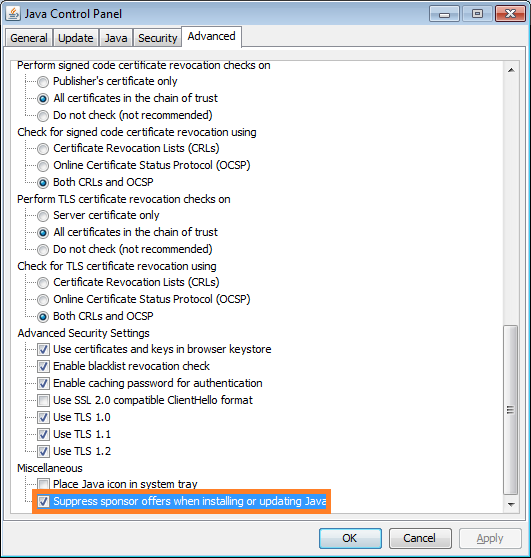
Java installer and updater offers bonus products like browser toolbars, that are mostly useless and annoying (unless you love those toolbars adorning half of your browser real estate). Not only does it offer you those products, but marks them for installation by default. These guys know you don't want it, and make it slightly tricky to uncheck them. You have to click exactly on the check box; usual UI should allow it even when you click on the adjacent text. But no, you have to click on the checkbox. You have to remember to uncheck it during installation or every time you update to prevent those toolbars from being installed. You can stop the installer or updater program from offering such products by selecting "Suppress sponsor offers..." option in their advanced setting. Go to Control Panel Go to Java (xx-bit) Go to the Advanced tab Scroll to the bottom of the list Add a checkmark to Suppress sponsor offers when installing or updating Java Alternatively...


Evolution of SAP ERP Architecture in 11 Steps

Image
Understanding SAP ERP Architecture can be a daunting task for a beginner. An easy way out is to begin from the beginning and see how the architecture evolved. We will start with what problem SAP started off to solve how they ended up with SAP S/4 HANA  in 11 (biggish) steps: Computers taking over jobs.   SAP could have been an IBM company  Welcome to the world of Real-time Systems  Client and Server Revolution  Functional Modules, Industry Solutions and Technology Layer   SAP R/3 up to 4.6c, EnjoySAP and what happened to "SAP R/3 4.6D"   SAP R/3 Enterprise Enterprise Extensions   Integrating the business, MySAP ERP 2003 and SAP NetWeaver   ESoA, MySAP ERP 2004 and NetWeaver 2004   NetWeaver suites up and ECC is a switchboard   The next big thing in the evolution Computerization of Business Processes With the advent of computing technology, companies looked for opportunities to automate various business tasks, ins...

SAP Process Integration Starter Guide for Basis Administrators

Image
This is a starter guide for Basis Administrators to understand the architecture and various nuances of SAP PI Administration. This guide will be updated time to time, so I recommend you to bookmark and keep revisiting this page as you see fit. Enterprises run different software solutions to support their business processes. Not all of them are built and supported by SAP. These solutions are integrated one-to-one using various middleware solutions or customized programs or scripts. When there is a change in one system or business process, multiple point-to-point interfaces are affected and are often expensive to change. Although these point-to-point interfaces are using different technologies, there are recurring themes. Although there are recurring themes, code is not reusable because they were implemented using different technologies. In 2003, SAP introduced NetWeaver, which helped them focus on providing a platform for integrating various aspects of business , in...

No More Memory for FCA

Image
The newer NetWeaver AS JAVA systems use ICM instead of JAVA Dispatcher. The communication between ICM and J2EE server node is handled through memory pipes (MPI) instead of sockets--An architectural feature of FCA (Fast Channel Architecture). Depending on the system throughput requirements, the default memory allocated to FCA may not always be sufficient, resulting in  no more memory for FCA errors. When these errors occur, the only way to free up FCA memory is a restart of J2EE engine. To avoid these errors: Check ICM parameter settings according to SAP note 737625. icm/max_conn, mpi/total_size_MB and mpi/max_pipes are important parameters. Add the parameter icm[J2EE]/enable_icmadm = true if it is not maintained according to SAP note 1635058. Check SAP note 715400 to check the maximum number of memory pipes Increase FCAServerThreadCount Maximum Server Threads count for ICM Requests of the HTTP provider service from java NWA (NetWeaver Administrator) or from t...

Invalid layout of preloaded class when starting SAP JVM

Most admins would have set up the SAP systems to get it monitored or analyzed by Solution Manager systems. Therefore the SAP JVMs are enabled with a connector to Wily Introscope. The AutoProbe Connector is compiled using the current JVM and can only be started if the JVM remains unchanged. When you patch the JVM or switch from third party JVM to SAP JVM, the connector class does not load. The JVM startup fails with one of the following errors: Invalid layout of java.lang.ClassLoader at uniqueId fatal error: Invalid layout of preloaded class Attempting to run an AutoProbe Connector with an incompatible JVM Attempting to run an AutoProbe Connector with an different JVM To get the JVM to start, remove the following VM parameters using Config Tool: -Dcom.wily.introscope.agent.agentName=<SID>_<Instance>_server<x> -Dcom.wily.introscope.agentProfile=D:/usr/sap/<SID>/.../applications.config/com.sap.smd.agent.application.wily/BytecodeAgent/ISAGENT.8.2.4...

Clean up of old repositories from SDM

When you deploy patched or support packs , all the previous versions are retained as a backup under SDM repositories. If you wish to clean them up, for example to Gain disk space, you can follow these steps from program directory ./StopServer.sh ./sdm.sh jstartup mode=standalone ./sdm.sh gc sdmhome=/usr/sap/SID/inst#/SDM/program ./sdm.sh jstartup mode=integrated ./StartServer.sh

Disabling data collection job in SAP PI

From PI 7.31 onwards, SAP has introduced Integration Visibility, to discover message flows for consuming applications to subscribe and get monitoring events on the discovered message flows. The data collector jobs can cause OutOfMemory errors. To fix the OOM errors, check SAP notes 1888326 and 2006192. It is very likely that this feature is not used yet. You can disable data collection in that case from Configuration Tool. Open ConfigTool and click on menu view --> expert mode, click the template Click the "Filter" tab, and new a 'custom rules' as: Action: stop; component:application; Vendor Mask: sap.com; component name mask: tc~iv~* Click Add Click Save and restart the system

Deploying .ear files

The standard deployment tool JSPM does not have an option to deploy a .ear file. The requirements to deploy ear files on SAP NetWeaver JAVA can be met using alternative tools: Using Telnet Call the telnet tool using the following command telnet localhost 5NN08 (Replace NN with the instance number. Example if your instance number is 00, the telnet port will be 50008) You will be prompted for username/password, logon with a J2EE admin user (ex: J2EE_ADMIN or Administrator) List down the server nodes using the following lsc Take note of a server node and jump to any server node using the following jump <server node> (Usually jump 0) Go to deploy application add deploy Deploy the ear file deploy <full path to ear file> on_deploy_error=stop You can also use guiconsole script located at /usr/sap/<SID>/J<nr>/j2ee/console. This script connects to telnet port and deploys the file. Using Deploy Script Change your directory to the location where dep...

Java Thread Stack Size Parameter -XssM

Each thread in the JVM stores method call arguments, return addresses and other information in a dedicated stack of its own. If a JAVA thread processes a large number of structures (example as a result of recursive calls) the stack size may not be sufficient to hold the information. The thread crashes with StackOverflowError . In such cases increase the stack size using the JVM parameter Xss. If the thread size is too large, the JVM runs into a risk of crashing with  OutOfMemoryError - unable to create new native thread (too many threads, each thread has a large stack). You need to decrease the Xss. To adjust this parameter on SAP J2EE engines, start Config Tool Select the Instance in the left side navigation pane On the right side pane, go to "VM Parameters" tab and then to the sub tab "Additional" Click on "New" if this is the first time you are adding Xss parameter Add -Xss<jvm-thread-stack-size>M (example -Xss3M) in the "Name...

How to deploy SCA files offline

New component deployment or applying fixes require the J2EE engine to be online. Assuming, you made a mistake that took J2EE offline and the only way to fix it is to apply a patch, you obviously need to get SAP's help. But if the system is a training or sandbox system, you can use batchdeployer to apply that fix while J2EE engine is offline. Go to /usr/sap/<SID>/<Instance>/j2ee/cluster/bootstrap/scripts Deploy the SCA using the following command syntax: batchdeployer.sh -sdu <absolute-path>/SCA-file.SCA

Java Memory Leak Analysis Tool: Step-by-step procedure to install Eclipse Memory Analyzer

Image
I have been dealing with OutOfMemory Errors on SAP J2EE applications and have used a few tools to analyze the reasons for JVM crash. I have finally settled at using Eclipse Memory Analyzer Tool. A step-by-step tutorial to install Eclipse Memory Analyzer Tool was published earlier. The menu options have changed slightly on MAT 1.3 (the latest version available to-date). Here are the instructions for MAT 1.3: Download required files to install Memory Analyzer Download Memory Analyzer from http://www.eclipse.org/mat/downloads.php If you are analyzing heap dump generated by SAP NetWeaver J2EE, download the Memory Analyzer Extension Pack zipped update site from https://www.sdn.sap.com/irj/scn/index?rid=/webcontent/uuid/c065b342-285c-2d10-559b-dffbb1aa5904 (requires access to SCN which is free). This update site contains information about SAP deployment locations. This file is not required if you are not analyzing an SAP application. If analyzing .phd files, download IBM's Dia...

How to Automate SLD Log Cleanup

Changes to SAP SLD are logged into the table BC_SLD_CHANGELOG . To prevent the growth of this log table, you can schedule a job from SLD UI Navigate to http://<host>:<port>/sld > Administration > Changes > Cleanup Task Configuration Select the "Schedule Task" button to trigger a Configuration Wizard Enter a value for Repeat Interval (frequency of the job in hours) Enter a value for Retention Period (entries older than this date will be deleted) A job with name Changelog Cleanup Task  will be created. This job can be monitored from Java Scheduler UI in NWA. Note : If you have configured SLD synchronization in a circular fashion DEV > QA > PRD > DEV, the changes made on one system will cause  BC_SLD_CHANGELOG  to grow very fast. Break the circular SLD update and cleanup the entries from  http://<host>:<port>/sld > Administration > Change log > Reduce Size of Change Log > delet...

Glassbox: Drop-in Java Diagnosis Tool

Image
Glassbox is a monitoring tool that can understand the methods and exceptions via Aspect Oriented Programming. The tool can monitor the the java application, diagnose specific errors, race conditions and performance issues and provide the result in plain english with supporting logs. Check out the Google Tech Talk on Glassbox.

SAP Java Server Node Not Starting

If the java server node is not starting up check the bootstrap properties. If you see the following, set the environment variable LDR_CNTRL to USERREGS. JVMCI200 - ERROR: User register saving is not enabled, Garbage Collection could be incorrect. JVMCI200 - ERROR: because of this the JVM library is explicitly aborting the process JVMCI200 - ERROR: You must either rebuild the executable using "-bM:UR" JVMCI200 - ERROR: or run with "export LDR_CNTRL=USERREGS" You can set the environment variable using the command 'export LDR_CNTRL=USERREGS' or 'setenv  LDR_CNTRL USERREGS' in UNIX depending on the shell used. USERREGS enables user register saving when system calls are made by the JVM.

Unable to View Java System Reports in NWA

If you get a java.lang.NullPointerException while trying to check Java system reports through NetWeaver Administrator (NWA), check if the applications required are running or not. 1. Go to http://<server>:<port>/nwa --> Operation management --> Systems --> Start&Stop --> Java EE Applications 2. Restart/start the following applications     tc~lm~webadmin~performance~provider_ear     tc~lm~webadmin~performance~viewer~wd     tc~lm~webadmin~monitor~state~wd     tc~lm~webadmin~monitor~complib~wd 3. Check SAP notes 1261071 and 1349854 if you are still unable to open the reports.

GRC RAR Row-prefetch value for Oracle Risk Analysis

If you are using Oracle database with GRC, you can set Row-prefetch value for Oracle Risk Analysis to tune the performance of Risk Analysis. The parameter uses the row-prefetching feature of Oracle JDBC driver to fetch multiple rows at a time (instead of the default one row) reducing the round trips to be made to the database layer. The extra rows are stored in the buffers and used by the later queries which pick one of the rows that are already placed in the buffer. To set the number of rows to prefetch, navigate to Configuration --> Risk Analysis (left pane) --> Performance Tuning --> Row-prefetch value for Oracle Risk Analysis. A value of 10 is a good starting point.

PI 7.3 Messages fail with 401 error but get processed on resend

The PI system uses ABAP as the user master. This means that the user ID details and passwords are maintained in ABAP stack. When a session is created in the Java stack, the UME service connects to ABAP and checks the user details. The number of connections from Java to ABAP are limited and under heavy load, the user check may timeout causing the Java stack to interpret it as an authentication problem. The result in PI is message process failure with a 401 error . You have to tune your system to ensure that there are no 401 errors due to heavy load. This can be done by increasing the following parameters: Max.Connections Max.Wait Time in ms Max.Connections specifies the maximum number of parallel UME connections between Java and ABAP and when call these connections are used up,  Max.Wait Time determines the time a request waits to get a free connection. You can increase/tune these values in the RFC destination  UMEBackendConnection using NW...

Video: JMS Thread Pool Usage

This video visualises the thread usage of the JMS Sender adapter in an SAP PI 7.11 interface deployed on the Advanced Adapter Engine, and highlights the sequential nature of message processing by a single adapter thread for each Java server node & communication channel combination. Advanced concepts such as JMS Prefetch Windows are not considered here for simplicity's sake.

SAP XI: Slow JDBC Service Start up

When a JDBC Reciver Channel is started, the adapter checks if it can connect to the database. If you have a lot of receiver channels that active and started, the jdbc service will take longer to do these tests. The test will be slower if the channels are not preperly configured (mostly the case with dev and quality environment). In some cases, the delays can lead to failure of startup of the JDBC adapter service due to timeout. The connectivity to the database can be skipped by setting lazyConnection option for service (affects all the channels) or specific receiver channel(s). JDBC Service Level: Call the Visual Admin and navigate to the jdbc adapter service. Set the property lazyConnection to true (default is false). Don't forget to save the changes. Receiver Channel Level: Open the channel in edit mode and go to advanced mode options. Add a new parameter lazyConnection with value true. If the lazyConnection is set true at the channel level it is taken as the effective...

OutOfMemory Error due to XSLT Transformations

XI uses caching to speed up XSLT transformations. The mappings structures (transformer objects) that are already generated are stored in a mapping pool for reuse. Whenever a mapping is required, a transformer object is required to execute the mapping. Therefore the mapping pool will store as many transformer objects as the number of messages being mapped. By default the maximum number of transformer objects is set to 20, which means that this limit is reached when 20 messages are being mapped using the same XSLT logic. Storing these transformer objects in heap can degrade performance or cause OOM error if the messages are large in size. To minimize the chances of performance problem due to caching of transformer objects: 1. Apply the latest patch for SAP J2EE ENGINE CORE 2. Reduce the maximum number of transformer objects that can be used in a memory pool to 1 (from default 20)    a. Call exchange profile http://<server>:<port>/exchangeProfile    ...