
Posts

Showing posts with the label unix

UNIX command tricks

Image
Some of the day to day UNIX commands used by a Basis admin have been covered by one of my previous posts. Here are some tips and tricks you might find usable. Replace a string from previous command and execute If you have run a command with an incorrect argument (usually a typo), you need not retype the entire command. You can use this trick to replace the typo and run the command. In this example, I am trying to list a file, but I typed the file name wrong: sapnwnewbie:user1 2> ls -l i-made-a-typo i-made-a-typo not found Now I correct the typo, and typo alone, using ^ in front of replacement and error. The corrected command runs automatically. sapnwnewbie:user1 3> ^ i-made-a-typo ^ startsap.trc ls -l startsap.trc -rw-r--r--   1 user1     group1       33155 Apr 17 03:03 startsap.trc Reusing last argument from the previous command This is useful if you have used an argument in a command and if you need to use it again this tim...
Fixing bdf output

The output of the bdf command is not formatted in a reader friendly fashion. For example the output of bdf sometimes writes the disk usage details in two lines Filesystem          kbytes    used   avail %used Mounted on /dev/sapsidvg/lvsapmnt                    8388608 3450677 4670062   42% /sapmnt To format the output properly, use the following awk trick:  bdf | awk '{if (NF==1) {line=$0;getline;sub(" *"," ");print line$0} else {print}}' The output know will look like this: Filesystem              kbytes    used   avail %used Mounted on /dev/sapsidvg/lvsapmnt 8388608 3450680 4670058   42% /sapmnt

Extracting Multipart SAP DVDs in Unix .exe followed by .rar

Large SAP DVDs are split into multiple parts. The first part is a rar file and the next parts are .rar or .zip files. One option is to double-click on the exe file from your windows PC, the DVD will be extracted to a folder, upload the folder to your UNIX system. The better way of doing this is extracting the files on UNIX system itself. Place all the DVD part files (.exe and .rar files in a single folder) Download the command line extractor unrar for your UNIX system. Run the unrar command against the .exe DVD part file: unrar x <archiv-name(exe-file)> <targetdir> As all the files are in a sequence (part1, part2 ...) all the files will be picked up and extracted. NOTE: On some system you need to execute ./unrar xvf <filename>.exe or ./unrar xvf <filename>.rar

Pulling information from Oracle table and assigning it to a UNIX variable

Let us say you have a table (myemployeetable) containing employee names, IDs etc and you are writing a script carrying a variable meant to hold the total number of employees. You can get the total count of employees by running a sql file and assigning the output to this variable. This is however not that straightforward. A sql command outputs a lot of information that has to be excluded when the result value is assigned to the variable. First, you don't want to print column names, so turn the heading off. set heading off Next, in the output, you do not want messages like "x records selected". To do this, turn feedback off. set feedback off Suppress all headers, page breaks, titles etc by setting the page size to 0. set pagesize 0 If you are using a SQL variable, you have to suppress how a variable is substituted before being sent to execution. This is done by turning verify off. set verify off The output of sql command shows "SQL>", this can ...

df and du show different results

The values shown by df and du can be different and in some cases the sizes may vary by a large amount. df works with the file system, where as du works with the files. When the OS processes are working with files, the files' contents are dynamically changing. The actual file size might change, but the meta information of the file (inode) will remain until the process is done with the file. The df command looks at information of the inode. du looks at the information of the actual file.

Brief Description of SAP Executable

Here is a list of SAP executables that you may find on your SAP systems. If you know of SAP exe files missing in from list, please leave a comment: R3check This is a tool that can check Cluster-Tables for errors. R3ldctl The tool for exporting all table structures to the file system during an OS/DB-Migration. R3load The table import & export tool of SAP during Installation, Upgrade and Migration. R3szchk The tool for determine the sizes of the different tables in the target database during the import in an OS/DB-Migration. R3ta Split large tables for export and import R3trans This is the tool, that does the real work for tp. tp controls the import and export of changes and r3trans does them using scripts, that were generated from tp. R3trans_164-20000978.SAR R3trans_164-20000978.SAR' is a compressed archive with the latest version of R3trans fr...

Checking if an Environment Variable is Set in UNIX Shell

We had a task to write a script to check if certain environment variables, which should not be set, were set. This task was straightforward with C shell: if $?GARBAGEENV then echo "Unset GARBAGEENV on `hostname`" endif With K shell, we did not find anything built-in. So we used something innovative. if test "isenvset${GARBAGEENV}" != "isenvset"; then echo "Unset GARBAGEENV on `hostname`" fi If GARBAGEENV was set to N, isenvset${GARBAGEENV} would be evaluated as  isenvsetN (which is not equal to isenvset). If it was not set isenvset${GARBAGEENV} would be evaluated as isenvset.

How to monitor file transfer progress in FTP

When you are transferring a large file using the ftp command line tool, you are not really sure if the transfer is going on or not. The prompt take hours to return with success or failure message. A very simple way to monitor the transfer is to use hash command in the FTP prompt. Example: $ ftp <host> user: <user name> password: <pass> ftp> hash Hash mark printing on (1024 bytes/hash mark). ftp> get a_very_large_file 200 PORT command okay. 150 Opening data connection for a_very_large_file ######################################## 226 Transfer complete.

SAP Java Server Node Not Starting

If the java server node is not starting up check the bootstrap properties. If you see the following, set the environment variable LDR_CNTRL to USERREGS. JVMCI200 - ERROR: User register saving is not enabled, Garbage Collection could be incorrect. JVMCI200 - ERROR: because of this the JVM library is explicitly aborting the process JVMCI200 - ERROR: You must either rebuild the executable using "-bM:UR" JVMCI200 - ERROR: or run with "export LDR_CNTRL=USERREGS" You can set the environment variable using the command 'export LDR_CNTRL=USERREGS' or 'setenv  LDR_CNTRL USERREGS' in UNIX depending on the shell used. USERREGS enables user register saving when system calls are made by the JVM.

Use of SIGUSR1 and SIGUSR2 on SAP Kernel

SIGUSR1 and SIGUSR2 are user-defined signals that can be sent to a process to perform the pre-defined actions. SAP has implemented these signals to help increase/decrease trace on the kernel program. The following actions are defined for the SIGUSR1 and SIGUSR2 signals on SAP programs like disp+work, gwrd, msg_server, icman, saprouter etc. 1. SIGUSR1 reduces the trace level by one 2. SIGUSR2 increases the trace level by one and writes the current call stack of the program to the trace file. The stack can then be used to determine which operating system routine the process is currently in. Then switch the trace level downwards with SIGUSR1 as, otherwise, the entire program flow is logged in the trace file and the size of the file increases very quickly . If you send the SIGUSR2 signal to an SAP work process (kill -USR2 <PID of work process>), the signal handler executes the pre-defined funtion for SIGUSR2 and the trace is written to dev_w<N> trace file. The trace is ...

Oracle "connected to an idle instance" and ORA-01034

When you try to connect to Oracle database and see " connected to an idle instance " as you enter sqlplus, there are chances that you have set incorrect file permissions. Check that $ORACLE_HOME/bin has "drwxr-xr-x" permisson The file "oracle" in $ORACLE_HOME/bin should have non-zero size and permission "-rwsr-s--x" If the permission differs, set it correctly using the following command chmod 6751 oracle

Disaster Recovery Plan

Disaster Recovery is the process, policies and procedures of restoring operations critical to the resumption of business, including regaining access to data (records, hardware, software, etc.), communications (incoming, outgoing) workspace, and other business processes after a natural or human-induced disaster. Here are some common aspects of designing a Disaster Recovery environment for a business application: 1. DR Server The server-that you intend to use in case of disaster-should contain the same version/patch of the Operating System as the primary server. You have to ensure that the disk allocation is similar to that of primary. You need not allocate identical server resources on the DR site, but you may need them when you intend to run the DR site as primary in the event of a disaster. 2. Standby Database Most of the database vendors provide you with an option to install and maintain a standby database, which keeps itself cloned with the primary database. Ex: ...

Functions in UNIX Shell

Functions in any programming language help you break down the script into logical subsections. UNIX shell lets you use functions. Let's look at an example function called hello. Here is how we define hello function: [user19@localhost ~]$ hello() { > echo hello. please enter your nme > read name > echo welcome $name > } To call function hello , simply call it by its name: [user19@localhost ~]$ hello hello. please enter your nme user1 welcome user1 You can list the functions that you have defined using set command. [user19@localhost ~]$set tmpid=509 hello () {     echo hello. please enter your nme;     read name;     echo welcome $name } To undefine the function , use unset command: [user19@localhost ~]$ unset hello Functions are stored in memory and therefore are faster than a regular script. Any script or program with the same name as the function will have lesser precedence. Let's see how we can use a...

Slow Cluster Communication with SAP XI on AIX

High throughput and other performance reasons require you to operate the SAP XI application in a cluster environment. Cluster communication then becomes an important factor so that all the server nodes are operating in a harmonious way. If you are using AIX as the operating system, you can improve the cluster communication by tuning tcp_nodelayack . If you set this option to 1, it prompts TCP to send an immediate acknowledgement, instead of waiting for 200 ms (default delay). Run the following commands as root user: To check the current setting: no -o tcp_nodelayack To set the option temporarily: no -o tcp_nodelayack=1 To set the option permanently: no -p -o tcp_nodelayack=1 For more details on this parameter check IBM's documentation . Read  AIX 5L Administration if looking for learning AIX basics.

Part 3 UNIX Stream Editor: sed

This is the last part on sed. Part 1 and 2 can be found as linked.. Multiple lines in pattern space Using N for multiple pattern lines The instruction N appends a newline character to the pattern space and waits for the next line. When the next line is read, it appends the line to the pattern space. Finally the resulting pattern space is output. Check these examples to understand N instruction. [user9@localhost ~]$ sed 'N' this is a test the line is not immediately printed here this is a test the line is not immediately printed here [user9@localhost ~]$ sed 'N' 1 2 1 2 3 4 3 4 [user9@localhost ~]$ sed 'N > N' 1 2 3 1 2 3 4 5 6 4 5 6 Print (P), delete (D) up to first embedded new line The instruction P prints the first part of the pattern space up to first embedded newline character and D deletes the first part of the pattern space up to first embedded newline character. In the following example, the first line is rea...

Part 1 UNIX Stream Editor: sed

Image
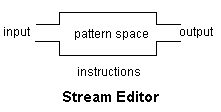
Stream Editor is a utility to parse text line-by-line and edit. Here is how a stream editor works: The first line from the input is read into a buffer (known as pattern space). By default this buffer can hold one line at a time. sed applies the instructions in the pattern space. The changed pattern space is output and the buffer is cleared. The process repeats for all the lines provided as input Let's understand sed through examples Substitution  The following sed instruction reads input and replaces the first occurrence of root on each line with ROOT [user9@localhost ~]$ sed 's/root/ROOT/' this is root this is ROOT ROOT is root ROOT is ROOT beetroot beetroot root root root ROOT root root If you want to replace all occurences of root with ROOT use /g [user9@localhost ~]$ sed 's/root/ROOT/g' this is root this is ROOT root is root ROOT is ROOT every occurrence of root will be replaced by root every occurrence of ROOT will be re...

FTP Scripts for UNIX and Windows

Here are example FTP scripts to get a file from an FTP server. UNIX: With this script, pass the ftp server hostname, user ID, password and file name with the command. If the script's name is myftpscript.ksh here is how you should use this script: myftpscript.ksh ftp_server user pass file_name #!/bin/ksh HOST=$1 USER=$2 PASSWD=$3 FILE=$4 # Change to working directory cd /ftp_working_directory #Delete existing file if [ -f ${FILE} ]; then rm ${FILE} fi #Download file from ftp server ftp -vn $HOST <<END_FTP > /ftp_working_directory/ftplog 2>&1 quote USER $USER quote PASS $PASSWD ascii get $FILE bye END_FTP exit 0 Windows: Again, pass the ftp server hostname, user ID, password and file name with the command. If the script's name is myftpscript.cmd here is how you should use this script: myftpscript.cmd ftp_server user pass file_name @ECHO OFF set PATH=C:\ftp_working_directory;%PATH% pushd "C:\ftp_working_directory...

How to Parse A Shell Command Twice

Let me introduce shell variables $0 ... $9, ${10}.., $# before I get to parsing shell command again using eval . Shell assigns the parameters that you pass though a command to its built in variables $1, $2... $9, ${10}... The number of arguments passed are stored in $#. Run this command: set a b c d e f g The command will set a to $1, b to $2, c to $3 ... g to $7 If I run the following command, the output will be c echo $3 Now let's look at the following example: echo $$ 9609 $$ returns the PID of the process echo $$$ 9609$ In the above example $$ is parsed as pre-defined variable $$ and the additional $ is appended to the output. What if I want to print $ followed by PID pf the process? I can do that by preceding that $ with \ \ tells the shell not to interpret the next character's special meaning. echo \$$$ $9609 Now let's get to parsing the command twice. If I want to print the last argument passed, how do I do i...

Part3: BEGIN and END Block in AWK

This is Part3 of the series of posts on awk utility. Part1: Introduction to AWK Part2: Regular Expressions in AWK As awk is used for reporting, one might need options to print a header or footer to the report. BEGIN and END statements allow that. BEGIN is used for declaring variables and printing banners while END is used for summaries and totals. The main block (which we have been using till now) is where the data stream (example: file or std input) is processed. In the main block, each line from the input is processed one by one, whereas the BEGIN and END blocks are procesed only once. The following example shows BEGIN block being used without main or END block. awk 'BEGIN{print "Welcome"}' Welcome In the above example, we did not pass any input. Let's look at how begin and main block are used awk 'BEGIN{print "Welcome"}{print}' Welcome Hi this is me typing Hi this is me typing In the above example, the begin block printe...

Asynchronous non-blocking I/O (AIO)

I/O operations are time consuming as the read/write is done on disks that need to rotate mechanically. If an application has to perfoamce a (synchronous, blocking) I/O operation, it has to wait until the operation completes, instead of using the available time to continue processing. This results in poor performance of the applications which are I/O intensive. AIO is a common method used by database and file servers to improve the performance concerning I/O operations. The application send the I/O request to a queue and as soon as it receives a confirmation that the operation is queued successfully, it continues to process while the I/O operation is performed in the background. In AIX, the number of asynchronous I/O kernel processes (AIO servers) can be tuned using minservers and maxservers  parameters. The number of min/maxservers is defined per processor. The maximum values these parameters can be assigned are 3 and 30 respectively. If you see the AIO ser...