Posts

Increasing R3trans and tp trace levels for SUM

If R3trans or tp runs in SUM fail and you want to troubleshoot it, you can try increasing the trace level to check the details on f the he failure. For R3trans: 1. Go to folder .../SUM/abap/tmp. 2. Create a text file named R3trans_trc_desc with the one-line content below. level:4 3. Retry the step in SUM to generate log files again. 4. Go back to chek the new log files with more detailed information For tp: 1. Go to folder .../SUM/abap/tmp. 2. Create a text file named tp_trc_desc with the one-line content below. level:4 3. Retry the step in SUM to generate log files again. 4. Go back to chek the new log files with more detailed information  Remove these files after the issue is reproduced. Leaving the trace level high will slow down the upgrade or update.
SUM MailNotifier - Get email notifications when SUM tool is waiting for user input

Image
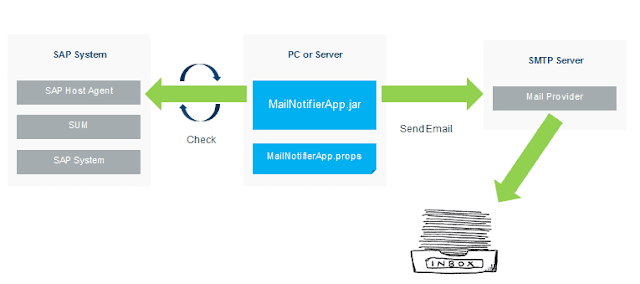
Starting with SUM 1.0 SP 18, SAP has delivered a client program MailNotifierApp.jar that connects with the host agent and triggers emails when SUM is waiting for a user input. MailNotifier has to run on a host that can connect to both SUM using HTTP(S) and SMTP mail server. This host can be your PC, Primary Application Server where SUM is running or any host that fulfills these conditions. In order to use MailNotifier Extract SUM tool and go to SUM\ABAP\mailNotifier. Copy MailNotifierApp.jar (application) and MailNotifierApp.props (properties file) to the host which can connect to SUM and SMTP server. Update MailNotifierApp.props file with appropriate parameter values. Start MailNotifier using the following command java –jar MailNotifierApp.jar properties=<path-to-MyMailNotifierApp.props-file> (or) java –jar MailNotifierApp.jar sum.sid=SID sum.user=sidadm You will be prompted to provide passwords The tool will try to connect with SUM and send a tes...

Choosing own schema name with SUM DMO procedure

When performing the DMO procedure with SUM, if you want to change the target schema name, set the following parameter in <path to SUM>/abap/bin/SAPup_add.par /migrate/AskTargetDBUSER=1 SUM will offer you a separate dialog to enter the schema name. The name will not get the suffix SAP.

How to bypass SSL security warning from Chrome - badidea

Image
If you are hitting something by IP and get a cert warning in Chrome, you can type "badidea" to bypass it quickly.

What is an SAP Instance?

An instance is a unit that can (and has to) be started and stopped as a whole. It is made up of several OS Processes, memory areas used by individual process and shared by all the processes, and files. Primary and Additional Application Servers The business logic is executed in an SAP instance. It can be an ABAP instance (logic is executed by work processes) or Java instance (logic is executed by application threads in a server node) An SAP system can be made up of several such instances. The first instance is called Primary Application Server (it used to be called Central Instance). Instances after PAS, that can execute business logic, are called Additional Application Servers (it used to be called as Dialog Instances) Central Services To keep track of which instance is up and is least loaded, SAP uses a Message Server. So if a logon is made via Message Server, it checks which instance is least used and logs the user on to that server. You can group the type of users, provi...

Install and explore HANA on your laptop - HANA Express Edition

Image
SAP has been providing the developer edition for developers/admins and ISVs to learn HANA. Although it is free, you needed to pay the service fee to AWS or Microsoft Azure. Now SAP has released a version of SAP HANA - SAP HANA Express Edition - that you can install on personal computer, small server or in the cloud. You can use the applications that you develop on this edition both for production and non-production scenarios, unlike Developer Edition which was available for non-productive use alone. The express edition, however, restricts access to some of  the feature such as smart data streaming, system replication, remote data synchronization and smart data integration. The express edition is free for use up to 32 GB of memory, and is extensible to 128 GB by paying license fee. It is supported on Windows (SAP ships it with a VM), Mac OS X (VM again) and Linux. You can also run express edition on small Intel servers running on SLES or RHEL. When using on cloud, you have...

No UP2 workprocess required for SAP BW

Image
Today I learned that you can avoid using UP2 work process on an SAP BW system. UP2 work process is used for statistical updates. In a NetWeaver ABAP Application Server, if you do not use a UP2 work process, its functions are taken over by UPD process. Given that the data is not written in to the BW database as frequently as in the case of a  transactional system, UPD process is not so much loaded. Therefore you can stop worrying about contention on UPD work process and let it perform UP2's job.

Basic differences between as-a-service options

Image
Companies tend to avoid maintaining hardware and software by signing up with vendors for using them as a service. X amount of hardware or software capacity used for y amount of time is what companies look for. The following as-a-service options are popularly available to help companies that look for consuming software and hardware rather than maintaining them: Infrastructure as a Service  - IaaS - provides you with the actual hardware and firmware, but lets you decide what goes on top. Platform as a Service  - PaaS - provides you with IaaS, as well as a general runtime (OS, programming language environments, databases etc). Software as a Service  - SaaS - provides you with PaaS, but also includes the software you want to run (anything from email to accounting); all you have to do is provide the data. So why did I start this blog with a picture of pizza? There is a Pizza as a Service analogy floating around trying to explain this concept with ...

Performance Assistant Notes and KBAs Search - PANKS

Image
PANKS is a tool that searches for SAP Notes and KBAs from the performance assistant based on the ABAP error code and context. When you click on  Search for SAP-Notes / KBAs  icon, the system searches for SAP Notes and KBAs based on the following passed information: Transaction (except SE38, SA38, and SE80) Program(s) Message class and message number Check SAP note  2020356 for pre-requisites, restrictions and dependencies. This tool is different from Automated Note Search Tool (ANST).

Three solutions from SAP Analytics portfolio

Image
OpenSAP has announced some new courses on SAP BusinessObjects Cloud and SAP Digital Boardroom powered by SAP BusinessObjects Cloud. While I am yet to learn about SAP BusinessObjects Enterprise, prospects of learning these new solutions created some confusion. So I took it upon myself to find out what these products are all about. SAP has been branding its products on analytics around BusinessObjects. BO has been a known brand name in analytics, so why rename and spoil that brand. Naturally BO is the name to go after. The on-premise solutions for analytics are delivered as  SAP BusinessObjects Enterprise . This product is available in three variants: Premium, Professional and Standard; in the decreasing order of functionalities delivered. Given the push for software-as-a-service or on-cloud products, SAP has introduced a cloud variant of BOE. They call it  SAP BusinessObjects Cloud . They originally called it  SAP Cloud for Analytics, but stuck to ...

SAP NetWeaver Guide Finder

Image
Today I learned about a  guide finder to search for SAP NetWeaver installation, upgrade and update guides . Search and get links to installation/upgrade/update guides quickly. Link to the guide finder:  https://cp.hana.ondemand.com/dps/d/preview/ec5624d5073d4c949b42bf284742748d/1.0/en-US/frameset.htm

Reorganising database reduces IO load by a huge factor

Image
Today I learned that an IO bottleneck in Oracle can be reduced significantly if the database is reorganized. We had a problem with a badly designed database file layout. SAP application, Oracle data files and the redo logs were all configured to be stored on a single disk. A higher than normal load on SAP system caused the entire system to crawl. Quickly checking a few transactions, which included ST06, showed that the response time of disks was very high, more than 500 ms. Before planning to redistribute the data files and redo logs away to a new disk, someone wanted to try a DB reorganization. When you reorganize the database, the fragmentation of data is reduced. So a read requires fewer blocks to be read and thus reduces the load on the disk. After the DB was reorged, problem was gone!

Microsoft Windows and SQL Server Versions

Image
Unless you are good with remembering numbers, you can't just look at the version number information of MS Windows or MS SQL Server and tell what the release, SP levels etc are. To quickly establish a correlation, you can use these two resources: Operating System Version (Windows) Microsoft SQL Server Version List For a quick reference, I have copied the latest information here: Operating system Version number Windows 10 10.0* Windows Server 2016 Technical Preview 10.0* Windows 8.1 6.3* Windows Server 2012 R2 6.3* Windows 8 6.2 Windows Server 2012 6.2 Windows 7 6.1 Windows Server 2008 R2 6.1 Windows Server 2008 6 Windows Vista 6 Windows Server 2003 R2 5.2 Windows Server 2003 5.2 Windows XP 64-Bit Edition 5.2 Windows XP 5.1 Windows 2000 5 * For applications that have been manifested for Windows 8.1 or Windows 10. Applications not manifested for Windows 8.1 or Windows 10 will return the Windows 8 OS version value (6.2). RTM  (no  SP ) SP1 SP2 SP...

Near line Storage in SAP BW

Image
Today I learned that apart from archiving old data to a file system, you have an option to store the data on a separate database, so that BW queries on old data can still be used for reporting. This is very useful when using BW on HANA. SAP BW powered by HANA, uses a multitemparature concept when deciding which data must be stored in memory and which data to push out of memory. The data on which reporting is done on a daily basis is HOT data. The data on which reporting is not daily or when you don't do any reporting at all (ex PSA tables and write optimised dso tables containing corporate memory) is WARM data. Warm data is offloaded from memory, when there is memory problem, to disk. This still ties the data to the database and is included with database backups and restore. SAP HANA uses a separate engine to carry out the dynamic tiering concept to offload such data. The data that does not change (historical data) can be shifted to a near line storage. F...

Where are other SAP applications headed with SAP S/4 HANA

Image
SAP S/4 HANA is a simplification of SAP ERP. The product is not a complete replacement of ERP yet. It began with simplification of finance code of ECC, with Simple Finance. In other terms SAP has replaced the code meant for the finance piece in ECC with a code that takes advantages of the technical capabilities of HANA and ignores other databases. This means that that code will only work on SAP HANA database. SAP is slowly simplifying other modules. Slowly the ECC part is being replaced by S4 Core. Now that S/4 HANA is not a complete replacement of ECC, it will have the other modules using the same old code, written on ECC, compatible with all the DBs. This way S/4 HANA stays as a compete product as ECC is. Does this mean that everything is being replaced? Apparently not. SAP has Succesfactors as its strategic HCM solution. So it will continue to develop HCM part in the compatible way (that works on AnyDB and HANA) With the evolution of S/4 HANA, the other SAP products are ...

Free SAP HANA book

Image
Today I learned that  SAP HANA Essentials eBook by Jeffrey Word  is available for free in EPUB and  kindle  formats on  http://www.saphanabook.com/ Click on Free Download link and enter 52F98A1C as the code.

Starting and Stopping SAP HANA

Image
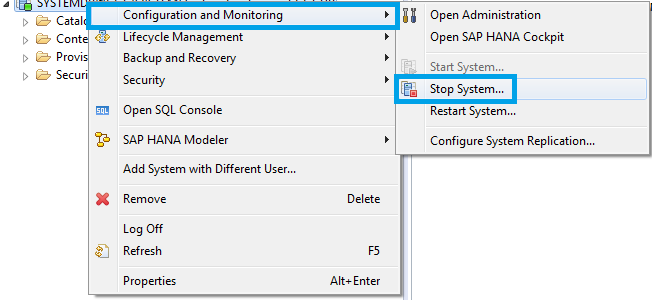
Stopping SAP HANA You can stop SAP HANA system from OS level using one of the following commands: HDB stop /usr/sap/<SID>/SYS/exe/hdb/sapcontrol -prot NI_HTTP -nr <NN> -function StopSystem HDB To stop HANA from HANA Studio Right-click on the system Choose " Configuration and Monitoring " and " Stop System " (you will be prompted to provide OS credentials) You can verify the status of SAP HANA system using the following commands sapcontrol -prot NI_HTTP -nr <NN> -function GetSystemInstanceList HDB info After shutdown hdbrsutil process will be running to keep row tables in memory. This allows for a faster HANA startup. If you wish to stop these processes (for example to reboot the host server), run the following command hdbrsutil -f -k -p <port number (e.g. 3xx03)> You can find the port number from the command "HDB proc" Starting SAP HANA You can start SAP HANA system from OS level using one of the followi...

Patch history tool for BI platform

Image
Today I learned about BOE and Data Services patch history tool. You can download it from  SCN wiki page : Here is how you use it Download and unzip  PatchHistory.jar  to the SAP BusinessObjects InstallData folder (for example C:\Program Files (x86)\SAP BusinessObjects\InstallData) or copy the file  InstallManifest.sqlite  to the same folder as your PatchHistory.jar (note: Java 1.6 is required) Double click the PatchHistory.jar (alternatively, launch the program using the command java -jar PatchHistory.jar) A .csv file is generated Open the .csv in Excel

UNIX command tricks

Image
Some of the day to day UNIX commands used by a Basis admin have been covered by one of my previous posts. Here are some tips and tricks you might find usable. Replace a string from previous command and execute If you have run a command with an incorrect argument (usually a typo), you need not retype the entire command. You can use this trick to replace the typo and run the command. In this example, I am trying to list a file, but I typed the file name wrong: sapnwnewbie:user1 2> ls -l i-made-a-typo i-made-a-typo not found Now I correct the typo, and typo alone, using ^ in front of replacement and error. The corrected command runs automatically. sapnwnewbie:user1 3> ^ i-made-a-typo ^ startsap.trc ls -l startsap.trc -rw-r--r--   1 user1     group1       33155 Apr 17 03:03 startsap.trc Reusing last argument from the previous command This is useful if you have used an argument in a command and if you need to use it again this tim...

My SAP HANA Bookmarks

Image
Here is a list of online resources relevant to SAP Basis support for SAP HANA. I will keep adding to this list as I discover more. Leave a comment if you would like to have something reviewed and added. Basics of HANA SAP HANA Essentials by Jeffrey Word - Free ebook (epub and kindle formats available). Use code 52F98A1C when registering for download. Introduction to Software Development on SAP HANA - openSAP course for developers. In-Memory Data Management 2015 by Prof. Hasso Plattner - Inner mechanics of In-Memory database aspects. SAP HANA Academy on YouTube - For bed-time learning. They have a lot of videos and cover pretty much all aspects of HANA. Hardware, H/W Configuration, Sizing and Pricing Sizing approaches for SAP HANA (Lessons Learned) - Goog starting point to HANA sizing. Certified and Supported SAP HANA Hardware - Appliances, Storage solutions and Supported entry level systems SAP HANA on IBM Power Systems - Harware planning, b...