Posts

Showing posts with the label HANA

Install and explore HANA on your laptop - HANA Express Edition

Image
SAP has been providing the developer edition for developers/admins and ISVs to learn HANA. Although it is free, you needed to pay the service fee to AWS or Microsoft Azure. Now SAP has released a version of SAP HANA - SAP HANA Express Edition - that you can install on personal computer, small server or in the cloud. You can use the applications that you develop on this edition both for production and non-production scenarios, unlike Developer Edition which was available for non-productive use alone. The express edition, however, restricts access to some of  the feature such as smart data streaming, system replication, remote data synchronization and smart data integration. The express edition is free for use up to 32 GB of memory, and is extensible to 128 GB by paying license fee. It is supported on Windows (SAP ships it with a VM), Mac OS X (VM again) and Linux. You can also run express edition on small Intel servers running on SLES or RHEL. When using on cloud, you have...

Free SAP HANA book

Image
Today I learned that  SAP HANA Essentials eBook by Jeffrey Word  is available for free in EPUB and  kindle  formats on  http://www.saphanabook.com/ Click on Free Download link and enter 52F98A1C as the code.

Starting and Stopping SAP HANA

Image
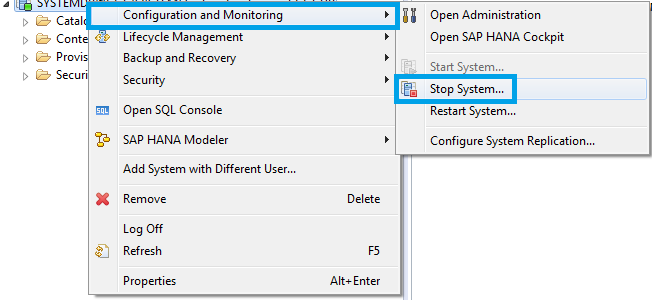
Stopping SAP HANA You can stop SAP HANA system from OS level using one of the following commands: HDB stop /usr/sap/<SID>/SYS/exe/hdb/sapcontrol -prot NI_HTTP -nr <NN> -function StopSystem HDB To stop HANA from HANA Studio Right-click on the system Choose " Configuration and Monitoring " and " Stop System " (you will be prompted to provide OS credentials) You can verify the status of SAP HANA system using the following commands sapcontrol -prot NI_HTTP -nr <NN> -function GetSystemInstanceList HDB info After shutdown hdbrsutil process will be running to keep row tables in memory. This allows for a faster HANA startup. If you wish to stop these processes (for example to reboot the host server), run the following command hdbrsutil -f -k -p <port number (e.g. 3xx03)> You can find the port number from the command "HDB proc" Starting SAP HANA You can start SAP HANA system from OS level using one of the followi...

My SAP HANA Bookmarks

Image
Here is a list of online resources relevant to SAP Basis support for SAP HANA. I will keep adding to this list as I discover more. Leave a comment if you would like to have something reviewed and added. Basics of HANA SAP HANA Essentials by Jeffrey Word - Free ebook (epub and kindle formats available). Use code 52F98A1C when registering for download. Introduction to Software Development on SAP HANA - openSAP course for developers. In-Memory Data Management 2015 by Prof. Hasso Plattner - Inner mechanics of In-Memory database aspects. SAP HANA Academy on YouTube - For bed-time learning. They have a lot of videos and cover pretty much all aspects of HANA. Hardware, H/W Configuration, Sizing and Pricing Sizing approaches for SAP HANA (Lessons Learned) - Goog starting point to HANA sizing. Certified and Supported SAP HANA Hardware - Appliances, Storage solutions and Supported entry level systems SAP HANA on IBM Power Systems - Harware planning, b...

How to Install HANA Studio

Image
HANA Studio is an important administrative and IDE tool to manage SAP HANA. Where to get the HANA Studio Software? You can download  HANA  studio from http://support.sap.com/swdc (requires S-user with download authorization) Select Support Packages & Patches and Browse Download Catalog Now traverse through the following links: SAP NetWeaver and complementary products SAP HANA SAP HANA PLATFORM EDITION SAP HANA PLATFORM EDIT. 1.0 Entry by Component HANA Studio SAP HANA STUDIO 2 Depending on your PC's operating system, choose one of the four links. Download one of the SAR files (the revision should either match or exceed the HANA Database Server revision). To extract the SAR file, you need SAPCAR executable. Extract HANA Studio SAR File Go to the folder where you downloaded  the HANA studio SAR file and SAPCAR.EXE, and run the following command SAPCAR.EXE -xvf IMC_STUDIO2_<Revision>_<Patch>_<Material...

HANA Alert 'Check whether the database is running in log mode overwrite'

HANA system triggers regular save points which are backed up in case of a database recovery. In order to recover the database at a point-in-time, logs must be recorded between the save points. If such recording in disabled (for example to prevent file system growth), the alert 'Check whether the database is running in log mode overwrite' is triggered. The log mode must be normal in a productive environment. To fix this alert, call HANA studio --> Configuration --> global.ini --> persistence and set the parameter log_mode to normal.

Reducing memory usage of HANA DB caused by table preload

Image
HANA database periodically keeps track of the column attributes loaded in to the memory during a normal operation. This information is stored as table preload information, which in turn is used to load the column attributes back after each restart of the index server. This results in improvement of query execution, but it also causes the memory usage to go up. Image: http://lunaticpoet.com/in-which-i-wish-i-had-a-pensieve/ Use the following procedure to reduce the memory usage: Deactivate the preload feature of the index server temporarily by setting the reload_tables parameter in the sql section to false Deactivate the collection of table preload information in the indexserver.ini file by adding the parameter tablepreload_write_interval in the persistence section and setting the value to 0 Restart SAP HANA Execute frequently used queries to load corresponding column table attributes into memory. Manually store the above information to be used for the next rest...

SAP HANA Log backup grows very fast

The log backup files grow fast in /usr/sap/<sid>/HDB<Instance Number>/backup/log if the frequency of the generation of log backup files is high. This frequency is controlled by the parameter log_backup_timeout_s . Change the parameter log_backup_timeout_s back to its default 900 from HANA Studio --> Configuration --> global.ini --> persistence --> log_backup_timeout_s --> 900

Stack Overflow Error when starting Indexserver

When a HANA system is restarted, it will try to process the in-doubt transactions. During such processing, the stack size of the Index Server may not be sufficient and the service fails with the error: STACK OVERFLOW: SIGNAL 11 (SIGSEGV) caught To fix this error, you have to increase the stack size by editing indexserver.ini file: [threads] default_stack_size_kb = 2048 worker_stack_size_kb = 2048 Repeat the restart after adjusting the values.

HANA Studio error - java was started but returned exit code =1

Image
If you get the following error when you try to start HANA studio, check if you are using a 64-bit Java. Java was started but returned exit code=1 If you cannot install a 64-bit java, try changing the -vm parameter in  Hdbstudio.ini file to point to jvm.dll file. Example: -vm C:\Development\Java\64bit\jdk1.7.0_09\jre\bin\server\jvm.dll Please note that the actual location of jvm.dll may vary on your system.

How to unlock a locked SAP HANA user?

Image
HANA Studio offers a secure  storage to store the user credentials and use those to connect with HANA database. If you change the user credentials, you must remember to update those in HANA studio as well. If the studio still uses the old logon data even after you changed the password, you may see the user locked due to  multiple failed logon attempts. To check if user is deactivated or how many invalid logons s/he has use the following SQL: SELECT NAME, USER_DEACTIVATED, INVALID_CONNECT_ATTEMPTS FROM "SYS"."P_PRINCIPALS_" WHERE NAME='<username>' If the user was locked/deactivated for other reasons (e.g. directly by a user admin), you may need to reset the password: alter user <username> password <password>; Update password in HANA studio To reset the number of failed attempts recorded, you can use the following SQL: alter user <username> DROP CONNECT ATTEMPTS;