Posts

Showing posts with the label windows 7

Prevent Java installer and updater from offering bonus products
Image
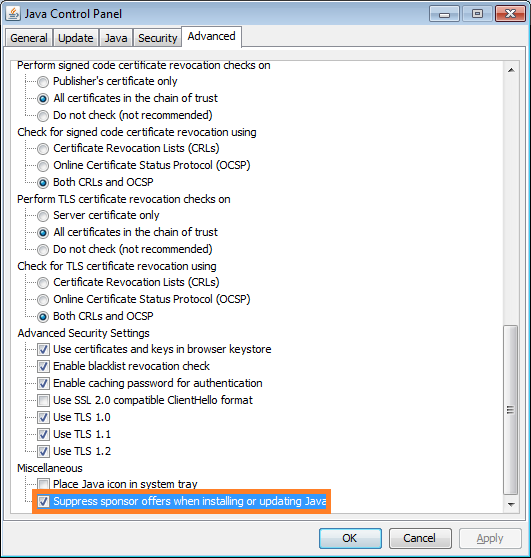
Java installer and updater offers bonus products like browser toolbars, that are mostly useless and annoying (unless you love those toolbars adorning half of your browser real estate). Not only does it offer you those products, but marks them for installation by default. These guys know you don't want it, and make it slightly tricky to uncheck them. You have to click exactly on the check box; usual UI should allow it even when you click on the adjacent text. But no, you have to click on the checkbox. You have to remember to uncheck it during installation or every time you update to prevent those toolbars from being installed. You can stop the installer or updater program from offering such products by selecting "Suppress sponsor offers..." option in their advanced setting. Go to Control Panel Go to Java (xx-bit) Go to the Advanced tab Scroll to the bottom of the list Add a checkmark to Suppress sponsor offers when installing or updating Java Alternatively...
Downloads folder in Windows loads slowly

Image
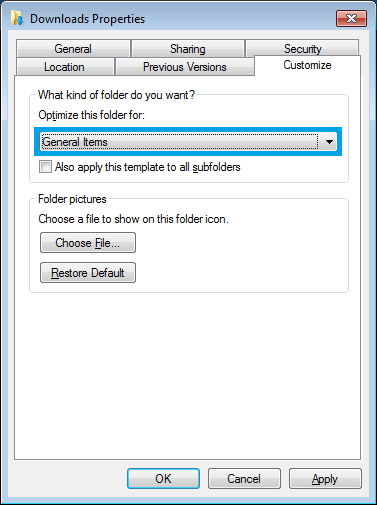
The downloads folder is the default location for files downloaded from various folders (some browser let you choose one during download and allow them to use a separate folder). The downloads folder usually ends up being optimized for images and when you have other files, it tends to slow down the file listing as you open it. One of the tricks is to change the settings of this folder to optimize it for a variety files and not just for pictures. Right click on the Downloads folder, select Properties and go to Customize tab. Select General Items from the drop down for Optimize the folder for . Click on Apply and OK to save the changes. More posts on proper usage of Windows OS: I changed Open with option of all the exe files. How to fix it? Prevent DDoS attacks on Skype. Get rid of animations and focus on task at hand. Attaching a file to a jpg.

Taking a Full Webpage Screenshot using Firefox

Image
If you need to take a screenshot of the entire webpage, you can use Firefox's built in command line feature to achieve it. Press Shift + F2, a command line prompt will appear at the bottom-left part of the browser window. Type screenshot --fullpage and press enter. The page will be saved in your default download location. There are other options available on the command line which can be looked up using the command help

Icon appearing on the Taskbar for a second

Image
After a recent patch, I started seeing an icon appear every minute or so on the taskbar and vanishing within a second. This was quite annoying while typing or watching full screen videos as it removed focus from my active window. To check what is causing the problem, I opened Task Manager (Ctrl+Shift+Esc) and sorted the processes by CPU. As soon as the icon reappeared, I notice  UI0Detect.exe showing on the top. UI0Detect.exe is an "Interactive Services Detection" that helps with user interaction if required by Windows services. Whatever UI this service was trying to present was not helping me as it popped up only for a fraction of a second, so I decided to disable it. The following steps helped me: Right-click on "Computer" icon on desktop and select "Manage" Expand "Services and Applications" Click on "Services" Right-click on "Interactive Services Detection" from the list Select "Stop" Right-click...

Fixing Slow YouTube on Chrome

Image
YouTube and many other online video hosts have been slow or under-performing while using Chrome. Chrome has its own built in flash player which YouTube uses to play videos. The performance of this player has been down lately. Until that gets fixed you can switch to using the official Adobe flash player installed on your computer by following these steps: Type about:plugins in the address space Search for "adobe flash player" plugin (usually the first entry) Expand the details by clicking on Details on top-right hand side of the page Find the plugin pepflashplayer.dll Disable the plug-in by hitting "disable" immediately below Restart Chrome to activate the change

How to Improve Firefox Performance

Image
The performance of Firefox can be improved by simply defragmenting its data files. By adding a script to run every time you start your computer, you can keep the files defragmented. Download sqlite from http://www.sqlite.org/download.html and place it in C:\Windows folder. Open notepad and copy these lines into it. Replace <YOUR_USER_ID> and <YOUR_PROFILE_FOLDER> with the actual values relevant to your system: cd C:\Documents and Settings\ <YOUR_USER_ID> \Application Data\Mozilla\Firefox\Profiles\ <YOUR_PROFILE_FOLDER> for %%i in (*.sqlite) do @echo VACUUM; | sqlite3 %%i exit Save the file with .bat extension. Create a shortcut to the batch file and place it in startup folder C:\Documents and Settings\ <YOUR_USER_ID> \Start Menu\Programs\Startup Now every time you start your computer this batch script will run and defragment the Firefox data files.

FTP Scripts for UNIX and Windows

Here are example FTP scripts to get a file from an FTP server. UNIX: With this script, pass the ftp server hostname, user ID, password and file name with the command. If the script's name is myftpscript.ksh here is how you should use this script: myftpscript.ksh ftp_server user pass file_name #!/bin/ksh HOST=$1 USER=$2 PASSWD=$3 FILE=$4 # Change to working directory cd /ftp_working_directory #Delete existing file if [ -f ${FILE} ]; then rm ${FILE} fi #Download file from ftp server ftp -vn $HOST <<END_FTP > /ftp_working_directory/ftplog 2>&1 quote USER $USER quote PASS $PASSWD ascii get $FILE bye END_FTP exit 0 Windows: Again, pass the ftp server hostname, user ID, password and file name with the command. If the script's name is myftpscript.cmd here is how you should use this script: myftpscript.cmd ftp_server user pass file_name @ECHO OFF set PATH=C:\ftp_working_directory;%PATH% pushd "C:\ftp_working_directory...

Why is Flash Player Slow while Playing Video

The flash elements like buttons, sliders and controls are designed in RGB color space, whereas the video is streamed in YUV. While presenting, the YUV video stream is converted to RGB and then combined with the RGB flash elements. This conversion is CPU intensive. The problem is magnified when you see the video in full screen mode. You can avoid this problem by installing  FlashVideoReplacer add-on on Firefox. This add-on will open the video with a standard multimedia player of your choice.

Firefox Slow and/or Causing High CPU Usage

One of the most likely cause of high CPU usage by Firefox is fragmentation of its database files (.sqlite files). If you have a habit of bookmarking and deleting unused bookmarks, places.sqlite, where bookmarks are stored, would be fragmented. You can shrink this file using sqlite3. If you are using Windows OS, downlod this file from http://www.sqlite.org/download.html and extract the executable to C:\Windows folder (or any other folder included in the PATH variable). If you are using Ubuntu, install sqlite3 using the following command sudo apt-get install sqlite3 To shrink the database file, run the following command after replacing <your profile>  with your profile name Windows: sqlite3 "%APPDATA%\Mozilla\Firefox\Profiles\<your profile >\places.sqlite" "vacuum" Ubuntu: sqlite3 $HOME/.mozilla/firefox/<your profile >/places.sqlite "vacuum" It is recommended that you take a backup of the sqlite file you are about to shri...

Help! I changed Open with for exe

Image
Someone right-clicked on an exe file and in the Open With option chose it to open with Internet Explorer. S/he probably left the check mark on "Always use the selected program to open this kind of file". All executables now started showing Internet Explorer's icon and started opening them with IE. If you are in a similar situation, here is what you can do to fix the problem: 1. Open the command prompt (Windows+r and type cmd) 2. Go to windows folder cd\windows 3. Open the Registry Editor using the following command regedit 4. Navigate to HKEY_CLASSES_ROOT\.exe and in right-hand-side pane, change value of Default key to exefile 5. Next, navigate to HKEY_CLASSES_ROOT\exefile\shell\open\command and in right-hand-side pane change value of Default key to "%1" %* 6. Restart your computer.

Sandboxie: Blocking Malware with Virtualization

Sandboxie runs other applications by injecting the application code into Windows kernel by API hooking. by doing this it redirects all the file system calls by the application to a virtual space. This essentially works as if a virtual hard disk is used by the application. The advantage of such mechanism is that any malware downloaded by the application (a web browser in most cases) is limited to the virtual space. For this reason sandboxie is regarded as great security tool. Another advantage of using sandboxie is that if you install a trial software on sandboxie, you will be able to use it beyond the trial period. Sandboxie doesn't work with 64 bit versions of windows 7. You may try DeepFreeze or Microsoft's SteadyState.  Returnil is a more powerful (paid) application. There is a free version of Returnil available for home use.

Permanently stopping programs from being added to Windows startup list

Image
Some programs are supposed to run from the point when you log into Windows and some are not so necessary, yet they are added to the list automatically. If you have deleted unwanted programs from the start list and see them added again after a few days, try WhatInStartup . Its "Permanent Disabling" feature can detect such additions and automatically delete them. Other features include google search feature to find more information on the selected program and disabling startup programs on an external (probably infected) Windows system.

Forgot Windows Admin Password--Reset with a 3 MB tool

Image
If you have lost your Windows Admin password and are looking for a free tool Offline NT Password & Registry Editor is the one for you. No need to download Ubuntu CD/DVD to just crack the password. This is a text based tool which can help you recover passwords on Windows 7, Windows XP and Windows Vista. You can download the bootable USB/CD from http://pogostick.net/~pnh/ntpasswd/bootdisk.html Follow these steps (with screen shots) to recover the password: http://pcsupport.about.com/od/toolsofthetrade/ss/ontpre-screenshot-guide.htm If you have an Ubuntu LiveCD , you can check these instructions out: http://www.psychocats.net/ubuntucat/resetwindowspassword/ Best Selling Software at Amazon: Microsoft Office 2010 Home & Student (Disc Version) Now you can easily post your Office documents online and access, share and edit them with Office Web Apps. It's an ideal way to extend your Office 2010 experience to the Web.

Stop Media Guide in Windows Media Player

Image
If you are annoyed with the Media Guide opening up every time you start Windows Media Player, you should know about this option. Go to Tools and select Options. Uncheck "Start Player in Media Guide" and save your changes. A lot of web sites suggest on blocking windowsmedia.com using the hosts file, but you still have Media Guide opening (of course with an error page). You could try that as well.

MSE Virus and Spyware Definitions Update Failed with 0x80070422

Image
Virus and spyware definitions update failed Security Essentials could not check for virus and spyware definition updates due to an Internet or network connectivity issue. Click Help for more information about this problem. Error code: 0x80070422 Error description: Security Essentials can't start the update service because it's been disabled by the security administrator or as a result of a problem in the registry data. If you get the above error when updating the virus definitions in Microsoft Security Essentials, stop the Background Intelligent Transfer Service and start Automatic Updates. You can start the services from Start --> Run --> services.msc. MSE requires both these services to run, but some users have observed that BITS causes failures when a manual update to the virus definition is made. Start the service back after you have done updating the definitions manually. You can also download the latest virus definitions from a separate computer and apply...

Google Chrome - Standalone/Offline/Alternate Installer

Offline Installer for Google Chrome Web Browser The Google Chrome Installer doesn't contain the software package. The browser software is downloaded when you run the installer. Google probably does this to avoid Aw, Snap moments during installation and save on support. However, if you need to install the browser on multiple machines, the installers will be downloading same files again. Google let's you download a standalone installer to make installing Chrome simple. You can access the installer here: http://www.google.com/chrome/eula.html?standalone=1 If you do not have authorizations to install software, you can get a portable version here: http://portableapps.com/apps/internet/google_chrome_portable Chrome rocks! Make it better by filing bugs at http://crbug.com and posting ideas at http://new.crbug.com

EULAlyzer - Detect Dangerous Terms in a License Agreement

Image
Most of us scan through the license agreements and simply agree to whatever the long boring text contains. When installing software, never just click past the license agreement. When joining a new site, don't just write off the privacy policy as too long and verbose to read. Copy and paste the license agreement into EULAlyzer, and it automatically tries to detect potentially dangerous terms and provide a detailed listing of potentially interesting words and phrases. You can also find out if the software you're about to install displays pop-up ads, transmits personally identifiable information or uses unique identifiers to track you. Download here:  http://www.javacoolsoftware.com/eulalyzerdl.html

Recuva - Recover Deleted Files

Image
Recuva is a free utility that helps in recovery of files deleted accidentally or by virus or due to system crash. You can also recover deleted emails (Microsoft Outlook Express or Mozilla Thunderbird). Recuva also helps in deleting your private files so that the file can't be recovered by any recovery software. Download Recuva:  http://www.piriform.com/recuva/download

Teracopy: Copy your files faster and easier

Image
http://xkcd.com/612/ The default method of copying a large number of files in windows can be a big pain. It stops when there is a problem with a single file; the estimate changes way too often; you can't pause it; multiple copies freeze the system. Teracopy is a free application to make copying easier. Features : Copy files faster . TeraCopy uses dynamically adjusted buffers to reduce seek times. Asynchronous copy speeds up file transfer between two physical hard drives. Pause and resume file transfers . Pause copy process at any time to free up system resources and continue with a single click. Error recovery . In case of copy error, TeraCopy will try several times and in the worse case just skip the file, not terminating the entire transfer. Interactive file list . TeraCopy shows failed file transfers and lets you fix the problem and recopy only problem files. Shell integration . TeraCopy can completely replace Explorer copy and move functions, allowing you work with...

Listen to Microphone on Windows 7 and Ubuntu

Image
Listening to Microphone on windows 7: Right-click on the Volume control icon and select "Recording deivices" Right-click on Microphone/Line In and choose Properties Go to Listen tab and check Listen to this device" Press Apply or OK to activate the changes. Listening to Microphone on Ubuntu: Install Jack:  sudo apt-get install jackd Open Jack control from Audio and Video Click on "Start" and then on "Connect" Select each capture_n, connect to the system in right panel and press connect You can use this feature to connect other audio devices to your computer.