Posts

Important Sap Gui Key Shortcuts That Will Increase Your Productivity
Image
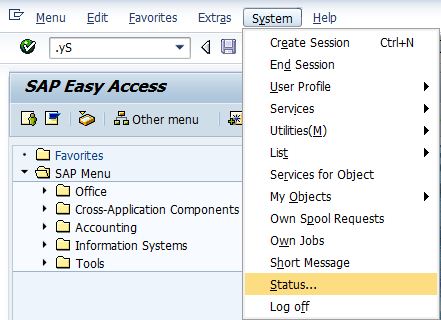
The area in which you enter an SAP transaction code is called Command-field or "OK Code". The shortcut to select this command field is CTRL+/ Here are some entry options for OK codes: /n - The /n option terminates the current transaction /n<TXNCODE> - The /n option terminates the current transaction and TXNCODE followed by /n calls transaction TXNCODE /nend - This option terminates all the sessions from the current PC and logs the user off. /nex - This option terminates all the sessions from the current PC and logs the user off immediately without issuing warnings /o - The option /o lists existing sessions and allows deletion or opening of a new session. /o<TXNCODE> - The option /o followed by a transaction code TXNCODE opens a new session and starts transaction TXNCODE in the new session. If the maximum number of sessions per user are breached, an error is displayed. /i - The option /i terminates the current session /i1 - The option /i1 terminate...

A new design

Image
I have spent this weekend getting to know how to build my own template from the scratch and try to provide a better user experience on this blog. I think I have met my goal to an extent. The credit goes to blackout on reddit and hammering of its alternatives' servers. I am also working on a sitemap to help my readers find other relevant stuff on this blog. I have to sift through all my posts yet to complete this sitemap. This is the first step. There will be a second sitemap to help navigate through non-SAP stuff on my blog. If I can figure out a better way to provide relevant posts on the blog post itself, I will add that feature. I used to use nRelate, which is now discontinued. If you know of a service other than linkwithin, please leave a comment! If you think your colleagues/followers/friends (usually the same) would like this blog, please mention us on Facebook , Twitter , LinkedIn  or Google Plus ! You don't want to do that? :-( Take this quiz to test your B...

Waterfox - 64 bit version of Firefox

Image
Firefox Nightly builds are also 64 bit, but Waterfox is generally more stable. Waterfox is a high performance browser based on the Mozilla platform. Made specifically for 64-Bit systems. It is compiled in Intel's C++ Compiler. ICC is known to generally produce faster code than other compilers, at least on Intel's own CPUs. It makes use of newer CPU features that allow fewer instructions to manipulate more data at once. It uses Jemalloc - a more scalable memory allocation library than most. The compiler uses profile-guided optimizations, which means that it generates an instrumented build that measures where CPU time is being expended during real world use, and uses this to tune the optimizer in a second compilation pass. Because it's 64-bit, you are able to use more of your computer's memory for web browsing. You'll notice the difference when you have a lot of tabs open. Not all the plugins work with Waterfox though.

Writing SAP GUI data into the developer trace of the AS ABAP

Image
The 7.4x kernels allow you to trace the data that is being exchanged with SAP GUI for troubleshooting purposes. The tracing of SAP GUI data can be enabled via the dynamic  profile parameter rdisp/sapgui_data_trace . The following values are supported: 0: do not trace any SAP GUI data. 1: trace SAP GUI data in case of errors only. 2: trace received SAP GUI data in processes with trace level set to 2 or 3. 3: trace sent and received SAP GUI data in processes with trace level set to 2 or 3. Also trace the received data before SNC decryption and decompression in the work process.

No Exchange Profile in a JAVA-Only PI System

Image
In a JAVA-only PI system (AEX or PO), the exchange profile URL http://<server>:<port>/exchangeProfile will be a blank screen as it is obsolete. If you want to add/modify an exchange profile parameter, you have to do it from NWA using the following steps: Go to http://<server>:<port>/nwa/sys-config (http://<server>:<port>/nwa > Configuration > Infrastructure > Java System Properties) Choose Services tab Search for "XPI Service: AII Config Service" and select it In Properties tab, search for the property to be changed or added. If the property exists, select the property, click on Modify, perform the changes and click on Save. If the property does not exist, click on Add, inform the value and click on Save.

Automatic Upgrade of SAP Host Agent

Image
Upgrading the SAP Host Agent by extracting the SAR file in each server and executing ./saphostexec -upgrade command is tedious in case of a large landscape. You can use the DIR_TRANS folder which is network shared across all the systems in the landscape and the auto upgrade feature of SAP Host Agent to your advantage. Add the following lines to the host_profile file: hostexec/autoupgrade_delay=300 DIR_NEW = /usr/sap/trans/HOSTAGENT_UPDATE_FOLDER In the above example case, the host agent checks the folder /usr/sap/trans/HOSTAGENT_UPDATE_FOLDER every 300 minutes (5 hours) to check if a newer version of host agent is available. You have to choose the upgrade delay and DIR_NEW values suitable to your environment. When you want to upgrade the host agent Download the latest host agent SAR file. Do not extract it yet. Go to the folder specified in DIR_NEW and create a file .upgrading. The .upgrading file ensures that the host agent does not copy the files while the e...

MDM Configuration Assistant Tool

Image
MDM Configuration Assistant is a standalone tool to help check typos, sub-optimal parameter values, duplicate parameters, missing mandatory parameters, relevance of the parameters within the sections, dependencies within the parameters, inconsistent and incorrect settings. MDM Configuration Assistant tool provides the following configuration options: Assistance with configuring MDM correctly so that you can connect your Master Data Server (MDS) to a DB server Assistance with validating and managing the configuration settings of the INI files (mds.ini, mdis.ini and mdss.ini) of your MDM server Prerequisites To run  Configuration Validation to Enable MDS Connection to DBMS option, MDM should be at MDM 7.1 SP03 or higher. Start MDM at least once so that the INI files are initialized. To run  Configuration Validation and Management of MDM Configuration Files option, MDM should be at MDM 7.1 SP06 or higher. JVM 6.1 or higher Downloading and Running the...