Posts

Showing posts with the label basis basics

What is an SAP Instance?

An instance is a unit that can (and has to) be started and stopped as a whole. It is made up of several OS Processes, memory areas used by individual process and shared by all the processes, and files. Primary and Additional Application Servers The business logic is executed in an SAP instance. It can be an ABAP instance (logic is executed by work processes) or Java instance (logic is executed by application threads in a server node) An SAP system can be made up of several such instances. The first instance is called Primary Application Server (it used to be called Central Instance). Instances after PAS, that can execute business logic, are called Additional Application Servers (it used to be called as Dialog Instances) Central Services To keep track of which instance is up and is least loaded, SAP uses a Message Server. So if a logon is made via Message Server, it checks which instance is least used and logs the user on to that server. You can group the type of users, provi...

Starting and Stopping SAP HANA

Image
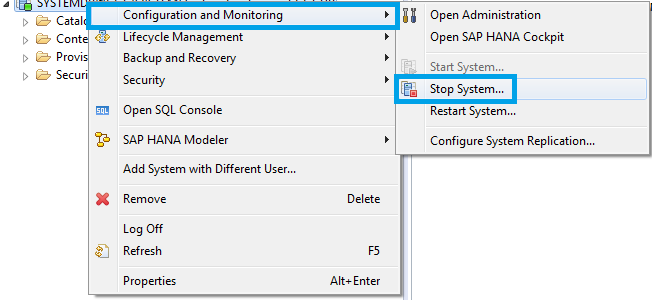
Stopping SAP HANA You can stop SAP HANA system from OS level using one of the following commands: HDB stop /usr/sap/<SID>/SYS/exe/hdb/sapcontrol -prot NI_HTTP -nr <NN> -function StopSystem HDB To stop HANA from HANA Studio Right-click on the system Choose " Configuration and Monitoring " and " Stop System " (you will be prompted to provide OS credentials) You can verify the status of SAP HANA system using the following commands sapcontrol -prot NI_HTTP -nr <NN> -function GetSystemInstanceList HDB info After shutdown hdbrsutil process will be running to keep row tables in memory. This allows for a faster HANA startup. If you wish to stop these processes (for example to reboot the host server), run the following command hdbrsutil -f -k -p <port number (e.g. 3xx03)> You can find the port number from the command "HDB proc" Starting SAP HANA You can start SAP HANA system from OS level using one of the followi...

UNIX command tricks

Image
Some of the day to day UNIX commands used by a Basis admin have been covered by one of my previous posts. Here are some tips and tricks you might find usable. Replace a string from previous command and execute If you have run a command with an incorrect argument (usually a typo), you need not retype the entire command. You can use this trick to replace the typo and run the command. In this example, I am trying to list a file, but I typed the file name wrong: sapnwnewbie:user1 2> ls -l i-made-a-typo i-made-a-typo not found Now I correct the typo, and typo alone, using ^ in front of replacement and error. The corrected command runs automatically. sapnwnewbie:user1 3> ^ i-made-a-typo ^ startsap.trc ls -l startsap.trc -rw-r--r--   1 user1     group1       33155 Apr 17 03:03 startsap.trc Reusing last argument from the previous command This is useful if you have used an argument in a command and if you need to use it again this tim...

Dealing with Common Memory-Related ABAP Short Dumps

Image
ABAP Dumps are one of the basic means of troubleshooting system issues. Here are some commonly occurring memory related short dumps and how to deal with these dumps. Dumps starting with TSV_TNEW_ When a work process requests for memory , the allocation is first from "Extended Memory" based on profile parameters 'roll_extension' and 'initial_size_MB' (in case of implementation variant UNIX_STD; or TOTAL_SIZE_MB in case of SHM_SEGS AIX). If the request for memory fails, memory allocation is attempted from "Private Memory" of the work process. If that allocation also fails, a runtime error "TSV_TNEW_ PAGE_ALLOC _FAILED" error is reported. The dump TSV_TNEW_BLOCKS_ NO_ROLL _MEMORY means that the roll buffer has been exhausted. Each transaction requires some main memory space to process application data. If the operating system cannot provide any more space, for example while initiating the memory for an internal table, the tra...

Evolution of SAP ERP Architecture in 11 Steps

Image
Understanding SAP ERP Architecture can be a daunting task for a beginner. An easy way out is to begin from the beginning and see how the architecture evolved. We will start with what problem SAP started off to solve how they ended up with SAP S/4 HANA  in 11 (biggish) steps: Computers taking over jobs.   SAP could have been an IBM company  Welcome to the world of Real-time Systems  Client and Server Revolution  Functional Modules, Industry Solutions and Technology Layer   SAP R/3 up to 4.6c, EnjoySAP and what happened to "SAP R/3 4.6D"   SAP R/3 Enterprise Enterprise Extensions   Integrating the business, MySAP ERP 2003 and SAP NetWeaver   ESoA, MySAP ERP 2004 and NetWeaver 2004   NetWeaver suites up and ECC is a switchboard   The next big thing in the evolution Computerization of Business Processes With the advent of computing technology, companies looked for opportunities to automate various business tasks, ins...

Important Sap Gui Key Shortcuts That Will Increase Your Productivity

Image
The area in which you enter an SAP transaction code is called Command-field or "OK Code". The shortcut to select this command field is CTRL+/ Here are some entry options for OK codes: /n - The /n option terminates the current transaction /n<TXNCODE> - The /n option terminates the current transaction and TXNCODE followed by /n calls transaction TXNCODE /nend - This option terminates all the sessions from the current PC and logs the user off. /nex - This option terminates all the sessions from the current PC and logs the user off immediately without issuing warnings /o - The option /o lists existing sessions and allows deletion or opening of a new session. /o<TXNCODE> - The option /o followed by a transaction code TXNCODE opens a new session and starts transaction TXNCODE in the new session. If the maximum number of sessions per user are breached, an error is displayed. /i - The option /i terminates the current session /i1 - The option /i1 terminate...

Test Your Basis Knowledge - Quiz 2

Please give 2 seconds for the quiz to load... Powered by Typeform

How to generate developer access key in SAP IDES

Image
For some reason, SAP newbies are under the impression that the process of generating developer access key on IDES is different from any other SAP NW system. It's not! Log on to the URL http://service.sap.com/sscr with your SAP S-user ID. Click on Register Developer. Enter the user name(s) and select the Installation for which the developer key is required, in this case it should be your IDES system's installation number. Click on Register. Copy the key and send it to the developer.

SAP System Properties - Important Categories

RDISP/* - Parameters for Dispatcher or processes controlled by the dispatcher (ex: work processes) ES/* & ZTTA/*- Parameters that control extended memory settings SCSA/* - Shared Common System Area settings ENQUE/* - Enqueue work process or standalone enqueue server settings GW/* - Gateway settings MS/* - Message server parameters INSTANCE* - Settings that identify instance or server ABAP/* - Settings that control ABAP program execution, including heap AUTH/* - Authorization specific parameters LOGIN/* - Controls the logon environment (ex multiple sessions) DBS/<DB Type>/* - Parameters related to database EM/* - General system related settings ICF/* & ICM/* - Internet control framework and ICM settings STAT/* - Statistics collector related parameters

User Authentication using Keys via PuTTY

Image
SAP Admins have to constantly log in to the server at OS level to carry out their every day tasks. A normal setup of SAP landscapes involves tens and hundreds of servers and logging on to these servers using passwords is error prone or slightly delayed by requiring to access password vaults. A simple solution is to use public-private keys to authenticate the users. You generate a key pair. Keep the private key a secret and upload the public key on the server. Then use the private key while logging on through PuTTY. Because you are keeping Private Key a secret, server accepts connections via the Private Key to recognize you. To set this up we first need to create the key pair Download PuTTYgen  and start it Click on Generate button to generate public and private key pair Move the mouse cursor to generate randomness Save the private key and copy the public key (or save the public key) We now have the key pair Place the Public Key on the server Log on to t...

SAP Upgrade Dependency Analyzer

Image
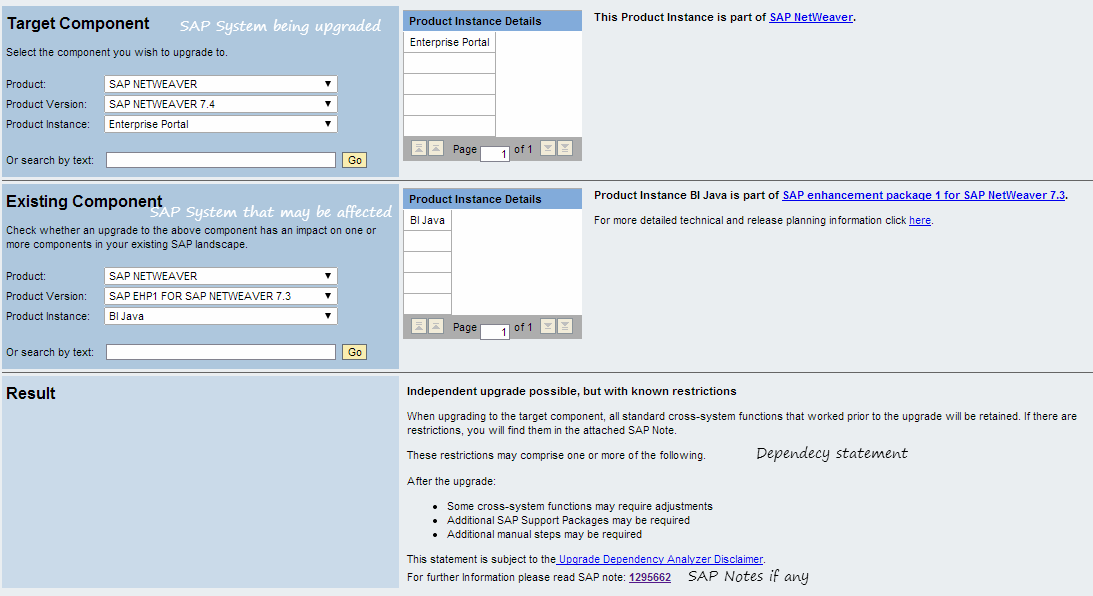
When you choose to upgrade an SAP system, it may break functionality on connected SAP systems. For example, when you upgrade your R/3 system to ECC, connectivity with SAP XI will not work as it was earlier. Similarly MDM upgrade will have issues if you use SRM-MDM catalogues. A quick check can be made using SAP Upgrade Dependency Analyzer to check if any additional changes are to be made on connected SAP systems.

High Number of JOBLG Files

Call transaction SP12 and go to the menu path TemSe Database > Memory Allocation The column "bytes in files" is the data going to filesystem. At the very bottom it counts data by date, and even by hour for the current date of the report run. In order to clean the files up, you can rely on the following SAP notes 6604        Deleting job logs at operating system level 16513      File system is full - what do I do? 48400      Reorganization of TemSe and Spool 666290    Deleting "orphaned" job logs A high number of JOBLG files in the global directory are usually due to orphaned job logs. You can delete all orphaned job logs files using RSTS0043.

Deploying .ear files

The standard deployment tool JSPM does not have an option to deploy a .ear file. The requirements to deploy ear files on SAP NetWeaver JAVA can be met using alternative tools: Using Telnet Call the telnet tool using the following command telnet localhost 5NN08 (Replace NN with the instance number. Example if your instance number is 00, the telnet port will be 50008) You will be prompted for username/password, logon with a J2EE admin user (ex: J2EE_ADMIN or Administrator) List down the server nodes using the following lsc Take note of a server node and jump to any server node using the following jump <server node> (Usually jump 0) Go to deploy application add deploy Deploy the ear file deploy <full path to ear file> on_deploy_error=stop You can also use guiconsole script located at /usr/sap/<SID>/J<nr>/j2ee/console. This script connects to telnet port and deploys the file. Using Deploy Script Change your directory to the location where dep...

SAP Oracle Database Refresh - Control file creation

Image
SAP refresh requires database to be restored and recovered on the target system. One of the most important steps in Oracle DB restore/recovery is the control file creation on the target system as the file locations and SID of the database change. Here are the steps to create control file: Generate the control file trace on the source system: 1. Ensure that the source DB is on open or mounted mode by running the following command select open_mode from v$database; The output should be MOUNTED or READ WRITE 2. Write the control file to trace by running the following command alter database backup controlfile to trace; 3. Find out where the trace is written by running the following show parameter dump; The location is most likely  /oracle/<SID>/saptrace/diag/rdbms/<sid>/<SID>/trace for SAP-Oracle database. Check the latest trace file. 4. Open the file and copy the section resembling the following as a new file ex: createcontrolfile.sql by r...

Oracle Database Overview - Memory Areas

Image
One of the most important aspects of understanding the Oracle system architecture is understanding how instance memory is divided. We will look at an overview of the memory areas which have relevance to database usage with an SAP application as SAP does not make use of all the memory areas available. There are two broad memory areas Memory shared by all the processes - System Global Area in Oracle Memory assigned to exactly one process - Program Global Area in Oracle System Global Area [SGA] Database Buffer Cache Also known as Buffer Pool or Data buffer or " Cache " This portion of SGA holds copies of the data blocks from the datafiles. The SQL operations on data objects are first performed on these blocks and then transferred to the datafiles by the DB Writer processes. The Buffer pool is further divided into the following parts Free Buffer - free space Pinned Buffer - holds data that is currently being accessed Dirty Buffer -  holds data that is mod...