Posts

Showing posts with the label sap tools

MDM Configuration Assistant Tool

Image
MDM Configuration Assistant is a standalone tool to help check typos, sub-optimal parameter values, duplicate parameters, missing mandatory parameters, relevance of the parameters within the sections, dependencies within the parameters, inconsistent and incorrect settings. MDM Configuration Assistant tool provides the following configuration options: Assistance with configuring MDM correctly so that you can connect your Master Data Server (MDS) to a DB server Assistance with validating and managing the configuration settings of the INI files (mds.ini, mdis.ini and mdss.ini) of your MDM server Prerequisites To run  Configuration Validation to Enable MDS Connection to DBMS option, MDM should be at MDM 7.1 SP03 or higher. Start MDM at least once so that the INI files are initialized. To run  Configuration Validation and Management of MDM Configuration Files option, MDM should be at MDM 7.1 SP06 or higher. JVM 6.1 or higher Downloading and Running the...

Archive Analysis of CO tables using RARCCOA1, RARCCOA2, RARCCOAA and RARCCOAP

Image
When you want to archive CO tables (COEP, COEJ, COSP, COSS, COST), there are several possible archive objects: CO_ALLO_ST CO_CCTR_PL CO_COSTCTR CO_ITEM CO_KSTRG CO_ORDER CO_PROCESS COPA2_* PM_ORDER PP_ORDER PR_ORDER PS_PROJECT RE_RNTL_AG SD_VBAK In order to choose the best archive object suitable to archive the data in your system, SAP has delivered the following programs: RARCCOA1 : Creates data extract for analysis of CO tables for archiving objects: CO_ITEM, CO_PROCESS, CO_KSTRG, RE_RNTL_AG, CO_COSTCTR, PS_PROJECT, CO_ORDER, PP_ORDER, PM_ORDER, PR_ORDER, SD_VBAK, COPA2_* RARCCOA2 : Evaluates the data extract from the report RARCCOA1 RARCCOAA : For analysis of CO tables for archiving object CO_ALLO_ST. RARCCOAP : For analysis of CO tables for archiving object CO_CCTR_PL. RARCCOA1 and RARCCOA2 Program RARCCOA1 counts the entries of required CO tables, assigns them explicitly to an archiving object and creates a data extract with the required information. ...

Preparing SOAP Axis Adapter Libraries SDA for SAP PI

Image
Axis stands for Apache eXtensible Interaction System . It is a toolkit that allows to quickly convert a JAVA programs to web services. SAP PI allows you to use the Axis framework in the SOAP adapter. To be able to use SOAP Axis Adapter, the SAP PI system should have the mandatory libraries deployed. To find out if the libraries are installed, call the URL http://<hostname>:<port>/XIAxisAdapter/MessageServlet Where <hostname> is the PI server host <port> is the HTTP port of the J2EE engine. This page (../XIAxisAdapter/MessageServlet) will provide links to the jar files required. Check SAP Note 1028961 to see if the jar files have any recommended successors. Download all the required jar files in to a folder. Download  sdaMakerTool.jar from SAP note 1028961 and start it using the command java -jar sdaMakerTool.jar Select the release of your XI / PI system From the drop down menu select the aii_af_jmsproviderlib.sda for XI 3.0 / P...

Performance Tests to Assess Enqueue Bottlenecks

Image
You can use the Diagnosis environment on the transaction SM12 to Check the configuration of enqueue function Perform tests to evaluate known possible bottlenecks and Perform tests for known issues To use this feature call SM12 and go to Error handling > Diagnosis environment or enter DUDEL in OK-CODE field. If this option is not available on the current SPS level of your release, download and configure the report Z_ENQUEUE_PERF from SAP note  1320810 .

SAP Upgrade Dependency Analyzer

Image
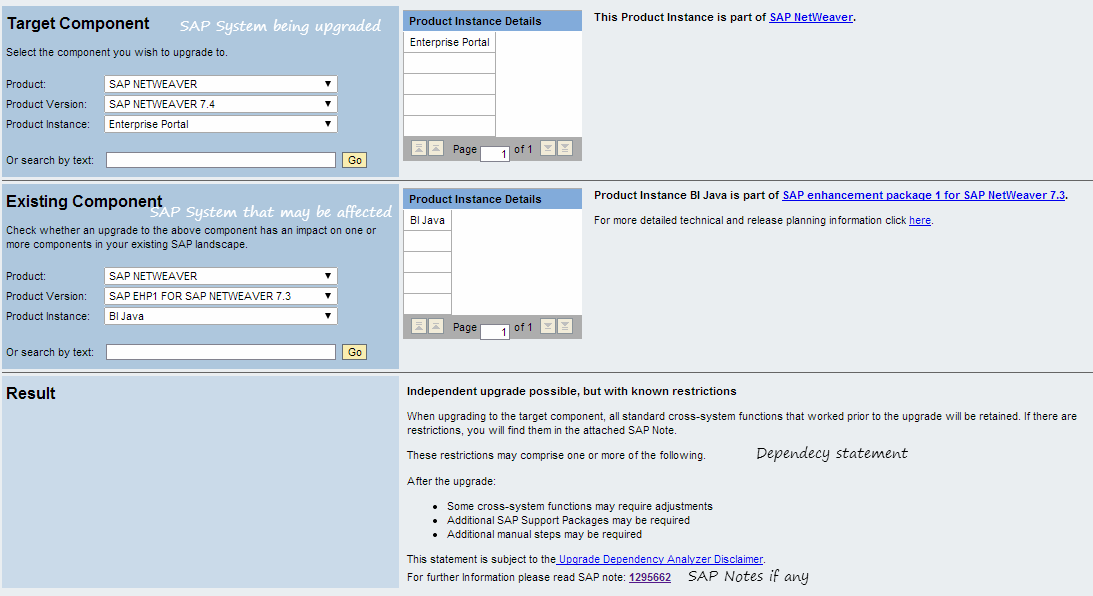
When you choose to upgrade an SAP system, it may break functionality on connected SAP systems. For example, when you upgrade your R/3 system to ECC, connectivity with SAP XI will not work as it was earlier. Similarly MDM upgrade will have issues if you use SRM-MDM catalogues. A quick check can be made using SAP Upgrade Dependency Analyzer to check if any additional changes are to be made on connected SAP systems.

Function code &SAP_EDIT

&SAP_EDIT was an easy function available for SAP Support experts to provide a fast solution for customers in a highly critical situation. As this function became increasingly known to others, SAP chose to deactivate it with Release 600 with Support Package 17 and Support Package 18. If you want the function back, implement SAP note 1446530 or use other techniques such as using function module se16n_interface or from SE16 in debug mode (Open the exact record you want to edit. Hit /h. Change the mode to EDIT, INSERT, etc.)

How to deploy SCA files offline

New component deployment or applying fixes require the J2EE engine to be online. Assuming, you made a mistake that took J2EE offline and the only way to fix it is to apply a patch, you obviously need to get SAP's help. But if the system is a training or sandbox system, you can use batchdeployer to apply that fix while J2EE engine is offline. Go to /usr/sap/<SID>/<Instance>/j2ee/cluster/bootstrap/scripts Deploy the SCA using the following command syntax: batchdeployer.sh -sdu <absolute-path>/SCA-file.SCA

Java Memory Leak Analysis Tool: Step-by-step procedure to install Eclipse Memory Analyzer

Image
I have been dealing with OutOfMemory Errors on SAP J2EE applications and have used a few tools to analyze the reasons for JVM crash. I have finally settled at using Eclipse Memory Analyzer Tool. A step-by-step tutorial to install Eclipse Memory Analyzer Tool was published earlier. The menu options have changed slightly on MAT 1.3 (the latest version available to-date). Here are the instructions for MAT 1.3: Download required files to install Memory Analyzer Download Memory Analyzer from http://www.eclipse.org/mat/downloads.php If you are analyzing heap dump generated by SAP NetWeaver J2EE, download the Memory Analyzer Extension Pack zipped update site from https://www.sdn.sap.com/irj/scn/index?rid=/webcontent/uuid/c065b342-285c-2d10-559b-dffbb1aa5904 (requires access to SCN which is free). This update site contains information about SAP deployment locations. This file is not required if you are not analyzing an SAP application. If analyzing .phd files, download IBM's Dia...

Monitor SAP PI queues on iPhone

SAP PI integration pipeline steps are processed as qRFCs. These calls can be monitored using the ABAP transaction SMQ2. If any of these calls fails, the next entries in the queue will not be processed until the failed LUW is reprocessed or cancelled. Therefore monitoring SMQ2 is important. There are several alert mechanisms in place, however they do not entirely replace manual monitoring. You can monitor SAP PI queues on iPhone or your website using the PI monitor tool freely available at Sourceforge. The features of this tool include: Perl kit with SAPNWRFC for Windows 32 bit (perl_with_nwrfc.zip) Save queue data to a SQLite database for later analysis (pi_monitor.zip) Google Charts to generate bar charts (pi_monitor.zip) iPhone web application (pi_monitor.zip)

Job Scheduling Software

Enterprises using multiple ERP systems look for a a job schedulers that can work with SAP and other ERP or DW vendors alike. Third party tools are not advisable if the Enterprise runs purely on SAP ERP. They increase the TCO, increase delays in problem correction, create high dependencies among technologies, and increase chances of miscommunication. If varied technologies are being used, investing in a third party scheduler is useful to have a centralized scheduler. Here are some popular schedulers: Control-M by BMC Cronacle by Redwood ORSYP by Dollar Universe Tidal Enterprise Scheduler by Cisco Tivoli Workload Scheduler (Maestro) by IBM  UC4 Global by UC4