Posts

Showing posts with the label mdm

Evolution of SAP ERP Architecture in 11 Steps

Image
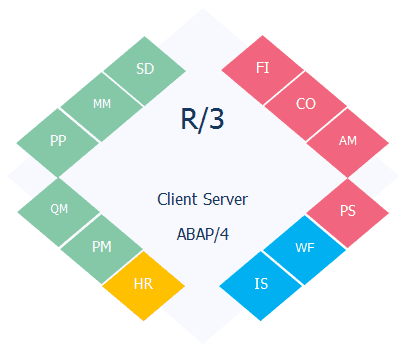
Understanding SAP ERP Architecture can be a daunting task for a beginner. An easy way out is to begin from the beginning and see how the architecture evolved. We will start with what problem SAP started off to solve how they ended up with SAP S/4 HANA  in 11 (biggish) steps: Computers taking over jobs.   SAP could have been an IBM company  Welcome to the world of Real-time Systems  Client and Server Revolution  Functional Modules, Industry Solutions and Technology Layer   SAP R/3 up to 4.6c, EnjoySAP and what happened to "SAP R/3 4.6D"   SAP R/3 Enterprise Enterprise Extensions   Integrating the business, MySAP ERP 2003 and SAP NetWeaver   ESoA, MySAP ERP 2004 and NetWeaver 2004   NetWeaver suites up and ECC is a switchboard   The next big thing in the evolution Computerization of Business Processes With the advent of computing technology, companies looked for opportunities to automate various business tasks, ins...
SAP ECC and Modules Explained in Simpler Terms

Image
SAP is the German company that owns these products which were started in the early 70s, roughly translated to systems, applications and products (in data processing). SAP is the global leader in Enterprise Resources Planning - the main system designed to store all data for across most (if not all) departments for any (large) corporation. An example is a retail store - has inventory, has product descriptions/prices/discounts, etc. vendors where product bought from, customers, sales for the day etc. now apply that to 1000s of products, millions of sales, hundreds of stores, multiples of vendors per product, 1000s of customers, etc etc. it generates an extremely large amount of data across various areas of the business - many accountants to look after the sales, a lot of HR/payroll to manage and schedule stuff, staff to manage inventory and delivery etc. And that's just one industry, SAPs core product, its ERP system, is called ECC6 and was previously called R/3 and some outda...

MDM Configuration Assistant Tool

Image
MDM Configuration Assistant is a standalone tool to help check typos, sub-optimal parameter values, duplicate parameters, missing mandatory parameters, relevance of the parameters within the sections, dependencies within the parameters, inconsistent and incorrect settings. MDM Configuration Assistant tool provides the following configuration options: Assistance with configuring MDM correctly so that you can connect your Master Data Server (MDS) to a DB server Assistance with validating and managing the configuration settings of the INI files (mds.ini, mdis.ini and mdss.ini) of your MDM server Prerequisites To run  Configuration Validation to Enable MDS Connection to DBMS option, MDM should be at MDM 7.1 SP03 or higher. Start MDM at least once so that the INI files are initialized. To run  Configuration Validation and Management of MDM Configuration Files option, MDM should be at MDM 7.1 SP06 or higher. JVM 6.1 or higher Downloading and Running the...

Cannot run Catalog application on SRM Portal

Image
Alright, so you have patched or upgraded MDM and now the SRM portal users or functional consultants see the following error The issue is usually triggered because of incompatibility between MDM server and MDM Catalog management component on SRM Java. You can check for compatibility from PAM . Search for MDM CATALOG and go to Support Pack Stacks tab. Open the note corresponding to SPS level of SRM_MDM_CAT and search for the term is based on . This will show the compatibility between SRM_MDM_CAT and MDM Server. Make sure you meet this requirement. Apart from SRM_MDM_CAT, there are two more components that are important MDM_CONNECTOR MDM_JAVA_API These components should be at the same SPS level as the MDM Server. The older SRM Java systems may not have MDM_CONNECTOR deployed, but it is mandatory to deploy this component from MDM 7.1 SP07.