Posts

Showing posts with the label ecc6

Automating Frontend Configuration of SAP Fiori

Image
The configuration of SAP Fiori is a painstaking process. On the front end system (where the gateway is used) you have to perform several tasks to activate Odata capabilities. You can automate most of those tasks using transaction STC01. With SAP NetWeaver 7.4 SPS 10, SAP has added tasks to automate OData and HTTP (ICF) services . Following are the task available on STC01 to perform Fronend setup: SAP_FIORI_LAUNCHPAD_INIT_SETUP - To activate launchpad OData and HTTP services on an SAP Gateway system (frontend) SAP_SAP2GATEWAY_TRUSTED_CONFIG - To create a trusted connection from an SAP system to SAP Gateway. SAP_GATEWAY_ADD_SYSTEM -  To connect an SAP system (backend) to an SAP Gateway system (frontend). SAP_GATEWAY_ADD_SYSTEM_ALIAS - To create a system alias for an existing remote function call destination (to backend). SAP_GATEWAY_ACTIVATE_ODATA_SERV - To activate multiple OData services. OData services are required to initially set up the SAP Fiori Launchpad and the ...

Evolution of SAP ERP Architecture in 11 Steps

Image
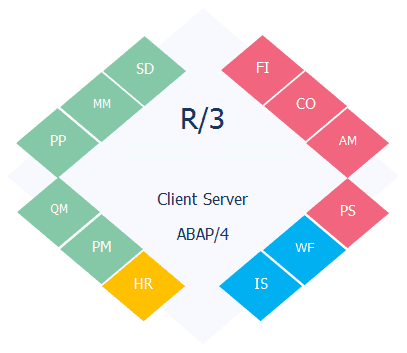
Understanding SAP ERP Architecture can be a daunting task for a beginner. An easy way out is to begin from the beginning and see how the architecture evolved. We will start with what problem SAP started off to solve how they ended up with SAP S/4 HANA  in 11 (biggish) steps: Computers taking over jobs.   SAP could have been an IBM company  Welcome to the world of Real-time Systems  Client and Server Revolution  Functional Modules, Industry Solutions and Technology Layer   SAP R/3 up to 4.6c, EnjoySAP and what happened to "SAP R/3 4.6D"   SAP R/3 Enterprise Enterprise Extensions   Integrating the business, MySAP ERP 2003 and SAP NetWeaver   ESoA, MySAP ERP 2004 and NetWeaver 2004   NetWeaver suites up and ECC is a switchboard   The next big thing in the evolution Computerization of Business Processes With the advent of computing technology, companies looked for opportunities to automate various business tasks, ins...

SAP ECC and Modules Explained in Simpler Terms

Image
SAP is the German company that owns these products which were started in the early 70s, roughly translated to systems, applications and products (in data processing). SAP is the global leader in Enterprise Resources Planning - the main system designed to store all data for across most (if not all) departments for any (large) corporation. An example is a retail store - has inventory, has product descriptions/prices/discounts, etc. vendors where product bought from, customers, sales for the day etc. now apply that to 1000s of products, millions of sales, hundreds of stores, multiples of vendors per product, 1000s of customers, etc etc. it generates an extremely large amount of data across various areas of the business - many accountants to look after the sales, a lot of HR/payroll to manage and schedule stuff, staff to manage inventory and delivery etc. And that's just one industry, SAPs core product, its ERP system, is called ECC6 and was previously called R/3 and some outda...

Archive Analysis of CO tables using RARCCOA1, RARCCOA2, RARCCOAA and RARCCOAP

Image
When you want to archive CO tables (COEP, COEJ, COSP, COSS, COST), there are several possible archive objects: CO_ALLO_ST CO_CCTR_PL CO_COSTCTR CO_ITEM CO_KSTRG CO_ORDER CO_PROCESS COPA2_* PM_ORDER PP_ORDER PR_ORDER PS_PROJECT RE_RNTL_AG SD_VBAK In order to choose the best archive object suitable to archive the data in your system, SAP has delivered the following programs: RARCCOA1 : Creates data extract for analysis of CO tables for archiving objects: CO_ITEM, CO_PROCESS, CO_KSTRG, RE_RNTL_AG, CO_COSTCTR, PS_PROJECT, CO_ORDER, PP_ORDER, PM_ORDER, PR_ORDER, SD_VBAK, COPA2_* RARCCOA2 : Evaluates the data extract from the report RARCCOA1 RARCCOAA : For analysis of CO tables for archiving object CO_ALLO_ST. RARCCOAP : For analysis of CO tables for archiving object CO_CCTR_PL. RARCCOA1 and RARCCOA2 Program RARCCOA1 counts the entries of required CO tables, assigns them explicitly to an archiving object and creates a data extract with the required information. ...

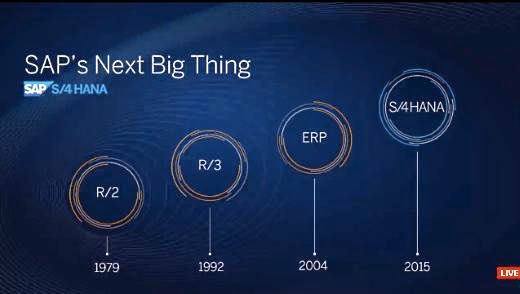
SAP S/4 HANA - Realtime and Simple

Image
SAP R/2 was the first highly stable solution released by SAP. "R" stood for real-time data processing and "2" stood for the two layers: presentation + integrated application & database. This was in late 70's, when companies were running their business applications on mainframes, and R/2 was apt with the existing technology. SAP R/2 marked the first generation of SAP's business solution. Then came SAP R/3 in the 90's, capitalizing on client-server architecture. "3" signified the three layer architecture (database, application and presentation). The separation of application layer from database layer reduced the load off database and helped improve the overall performance of the solution. This was immensely popular (second) generation of SAP's business solutions. One can attribute the success to Y2K and SAP R/3 fitting the business needs of most organizations looking to dodge Y2K paranoia. SAP was riding the wave of Y2K-led-success ...

SAP Gateway 2.0 Parameter Tuning

Here are some important SAP profile parameters that can help the gateway performance: The number of dialog work processes should be sufficient to handle the requests: rdisp/wp_no_dia is recommended to be set at Number of Cores x 4 . You can always increase this number as long as the average CPU usage is below 80%. Check ST03 %Wait Time for DIALOG type tasks. If this values is more than 50 ms or 10% of average response time, then the number of WPs are not sufficient. The keep-alive timeout should be set at 60 sec . The timeout is controlled by icm/keep_alive_timeout and overridden by the timeout set in the parameter icm/server_port_<xx> The maximum number of simultaneous open connections in ICM is determnined by icm/max_conn . Set this parameter to Number of Active Users x 1.2 . Check SMICM and ensure that Peak value is less than the Maximum value against "Connections Used". When you change icm/max_conn, change the maximum number of sockets ( icm/max_sockets )  ...

SAP Upgrade Dependency Analyzer

Image
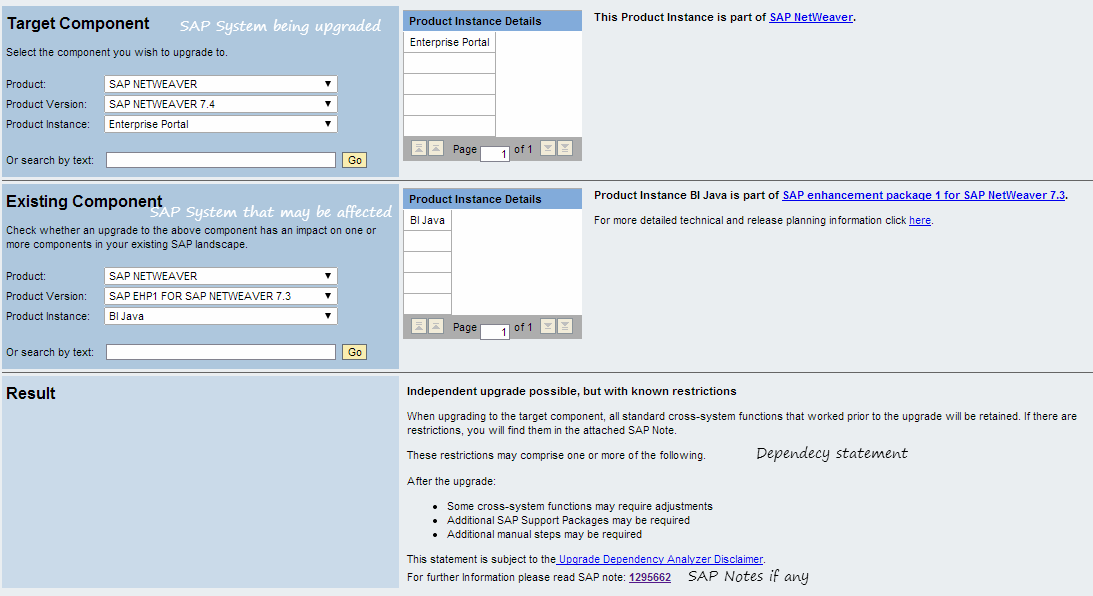
When you choose to upgrade an SAP system, it may break functionality on connected SAP systems. For example, when you upgrade your R/3 system to ECC, connectivity with SAP XI will not work as it was earlier. Similarly MDM upgrade will have issues if you use SRM-MDM catalogues. A quick check can be made using SAP Upgrade Dependency Analyzer to check if any additional changes are to be made on connected SAP systems.

Function code &SAP_EDIT

&SAP_EDIT was an easy function available for SAP Support experts to provide a fast solution for customers in a highly critical situation. As this function became increasingly known to others, SAP chose to deactivate it with Release 600 with Support Package 17 and Support Package 18. If you want the function back, implement SAP note 1446530 or use other techniques such as using function module se16n_interface or from SE16 in debug mode (Open the exact record you want to edit. Hit /h. Change the mode to EDIT, INSERT, etc.)

Oracle 11g Extended Statistics for SAP Tables

Extended Statistics is an attempt to fix one of the flaws in CBO--values of different columns are not correlated. Let us take an example of two columns in a table. One of the column contain department code and the other contains employee name. Let us assume that there are 10 departments and 3000 employees in our example. In a real life scenario, all the employees do not belong to all the departments, but CBO assumes that is the case and hence it assumes that there are 3000*10 = 30000 combinations of employee name and department code that exist. In reality, it can be between 3000 and 30000 (assuming employee belongs to at least one department and can clock for multiple departments). The CBO is not intelligent to know these relations and this assumption can have serious performance impact on join operations. In order to calculate better statistics, we can use extended statistics from Oracle 11g onwards . SAP has provided these statistics for AUSP, BKPF, MSEG and HRP1001 tables as ...

Job Scheduling Software

Enterprises using multiple ERP systems look for a a job schedulers that can work with SAP and other ERP or DW vendors alike. Third party tools are not advisable if the Enterprise runs purely on SAP ERP. They increase the TCO, increase delays in problem correction, create high dependencies among technologies, and increase chances of miscommunication. If varied technologies are being used, investing in a third party scheduler is useful to have a centralized scheduler. Here are some popular schedulers: Control-M by BMC Cronacle by Redwood ORSYP by Dollar Universe Tidal Enterprise Scheduler by Cisco Tivoli Workload Scheduler (Maestro) by IBM  UC4 Global by UC4

Mass Changes to Step User of Background Jobs

The users define hundreds of jobs to meet their business needs. When they leave the company their user IDs will be deleted/locked/expired, requiring changes to the jobs on SAP system. Manually changing the step user ID of hundreds of jobs for a specific user ID is a tiring and error prone exercise. If you find yourself in such a situation, implement sap note 1532884 to import BTC_MASS_JOB_CHANGE report, which can help make the task relatively simple.

Force Target Field Empty Jobs to Run on Specific Instances

In a typical SAP system, we install Additional Application Server(s) which is dedicated for running jobs. To ensure that the jobs are running on this instance, the Target server field should be maintained while scheduling the job. The end users may sometimes forget to define this field or there may be many jobs already defined, with this field empty, before the Additional Application Server (or Dialog Instance) was designed to specifically run reports in background. You can still make the jobs to run on these Additional Application Servers by creating SAP_DEFAULT_BTC server group in SM61 . SAP_DEFAULT_BTC is an implicit group which jobs with empty Target server field run on. By defining this group explicitly and adding the chosen Additional Application Servers to the group, you can force the jobs to run on the required Additional Application Servers.