Resetting SAP Upgrade
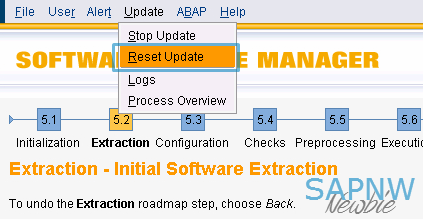
While SAP upgrade is in the preparation phases, SUM tool offers an option to reset the work done by SUM tool from the menu option: Update > Reset update This is the recommended method of resetting the upgrade. If the upgrade was not properly reset from a previous attempt. The subsequent run can fail at the step PREP_INIT/VALCHK_INI with error similar to the following: SAPup broke during phase VALCHK_INI in module PREP_INIT / Initialization Error Message: SAP_ABA is in an undefined state, that is not safe to be upgraded, reason Upgrade wasn't completed - Call the SAP Support This example shows SAP_ABA component, it could be any component(s) that may be in undefined state. If you encounter this problem, you have the following two choices: 1. Reset from command prompt by executing SAPup with reset prepare option cd <upgrade directory>/abap/bin ./SAPup reset prepare 2. Run the report RSUPGRES as DDIC user from 000 client The repor...