Posts

Showing posts with the label chrome

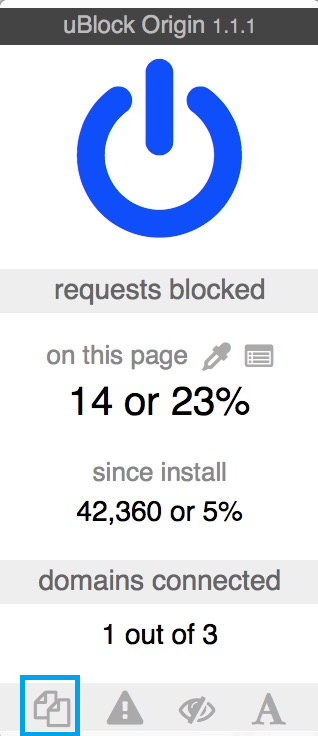
Preventing Pop-Under Ads on Google Chrome using uBlock Origin

Image
uBlock Origin is a great ad-blocker, using minimal resources compared to Adblock Plus. However, simply installing it is not going to help with controlling pop-under ads. When you visit the offending website, click the bottom left button in ublock to block all popups/pop-unders.

How to make the speaker icon on Google Chrome function as mute button

Image
Enter "chrome://flags/#enable-tab-audio-muting" into a tab, hit enter and click on enable.\ For the flag change to reflect, restart Chrome. Now the speaker icon functions as mute/unmute button

Getting your Grooveshark playlist from Chrome and Firefox

Image
Grooveshark has been shut down. If you have opened Grooveshark with chrome and your local cache intact, you can retrieve your playlist from chrome's local storage. Go to grooveshark.com in chrome (haven't tried in other browsers) Open "Developer Tools" (CTRL+SHIFT+I) Click on "Resources" Tab Expand "Local Storage" tree Click on " http://grooveshark.com " Find the key that looks something like "Library32467954" (some 7+ digit number) Look at its "value" (it's a JSON string). You should see something like this "{"lastModified":.....blah blah some artist name... Right-Click on that cell, click "Edit Value", then hit CTRL+C (Copy) Paste the contents of your clipboard into the window @  https://json-csv.com/ Download the resulting .CSV file in Open Office or Excel Firefox users can run the following in the console (Ctrl+shift+k) to try and retrieve the information: for (...
YouTube slow on Chrome

Looks like Adblock is causing youtube videos to not load or buffer slowly. Try disabling Adblock or Adblock Pro and see if it fixes the problem. If that doesn't work, try disabling pepflashplayer.dll

Chrome extension to password protect bookmarks

Image
Hush is a useful extension that allows you to save bookmarks behind a password of your choosing. The bookmarks are stored using industry-standard AES encryption which can be decrypted using the password that you set. You can have multiple sets of bookmarks, each with its own key. It only operates in incognito mode for security reasons.

"Textpad" in Browser

Image
If you wish to take notes, you can do it on your browser itself. Type the following line in the address bar and you have temporary text document data:text/html, <html contenteditable>

SAP Note Shortcut on Chrome

Image
We have seen how one can define a search engine for searching SAP notes from Firefox . It can be done on Chrome also. Right click on the address bar and choose Edit search engines... Fill out the fields as follows Name: sapnote Keyword: s URL: https://service.sap.com/sap/support/notes/%s When trying to open a note type s followed by the note number

Fixing Slow YouTube on Chrome

Image
YouTube and many other online video hosts have been slow or under-performing while using Chrome. Chrome has its own built in flash player which YouTube uses to play videos. The performance of this player has been down lately. Until that gets fixed you can switch to using the official Adobe flash player installed on your computer by following these steps: Type about:plugins in the address space Search for "adobe flash player" plugin (usually the first entry) Expand the details by clicking on Details on top-right hand side of the page Find the plugin pepflashplayer.dll Disable the plug-in by hitting "disable" immediately below Restart Chrome to activate the change